Inbound mail: mailboxes, attachments, quarantine and sending
createInboundMailFoundationFeature() connects a tenant’s mailboxes (IMAP, Gmail, Microsoft 365), imports every new mail as an event and lets the app send replies from the same mailbox. This guide shows what an admin sees and what an app developer builds on.
For admins
Section titled “For admins”The mailbox list
Section titled “The mailbox list”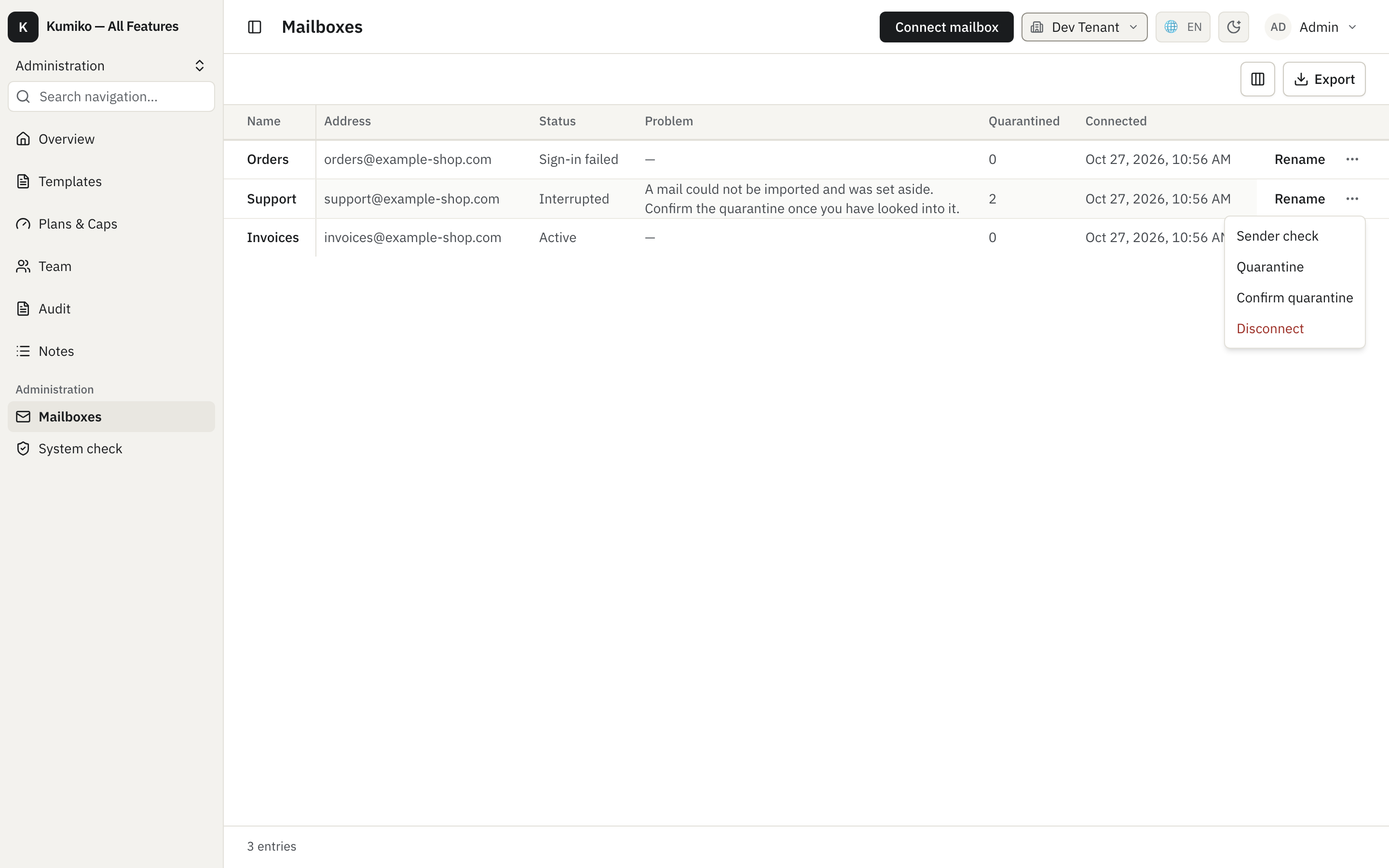
Each mailbox shows its state:
- Active: mail is fetched on schedule.
- Sign-in failed: the server rejected the stored login, usually after a password change. Nothing is fetched until the mailbox is reconnected. The Problem column stays empty here because the status already names the cause.
- Interrupted: fetching works, but something needs a decision, for example mails that could not be imported. The row says which problem it is.
The quarantine count shows how many mails could not be imported. “Confirm quarantine” in the row menu marks them as seen; the mailbox returns to active on its next sync.
Reactivate after a sign-in error
Section titled “Reactivate after a sign-in error”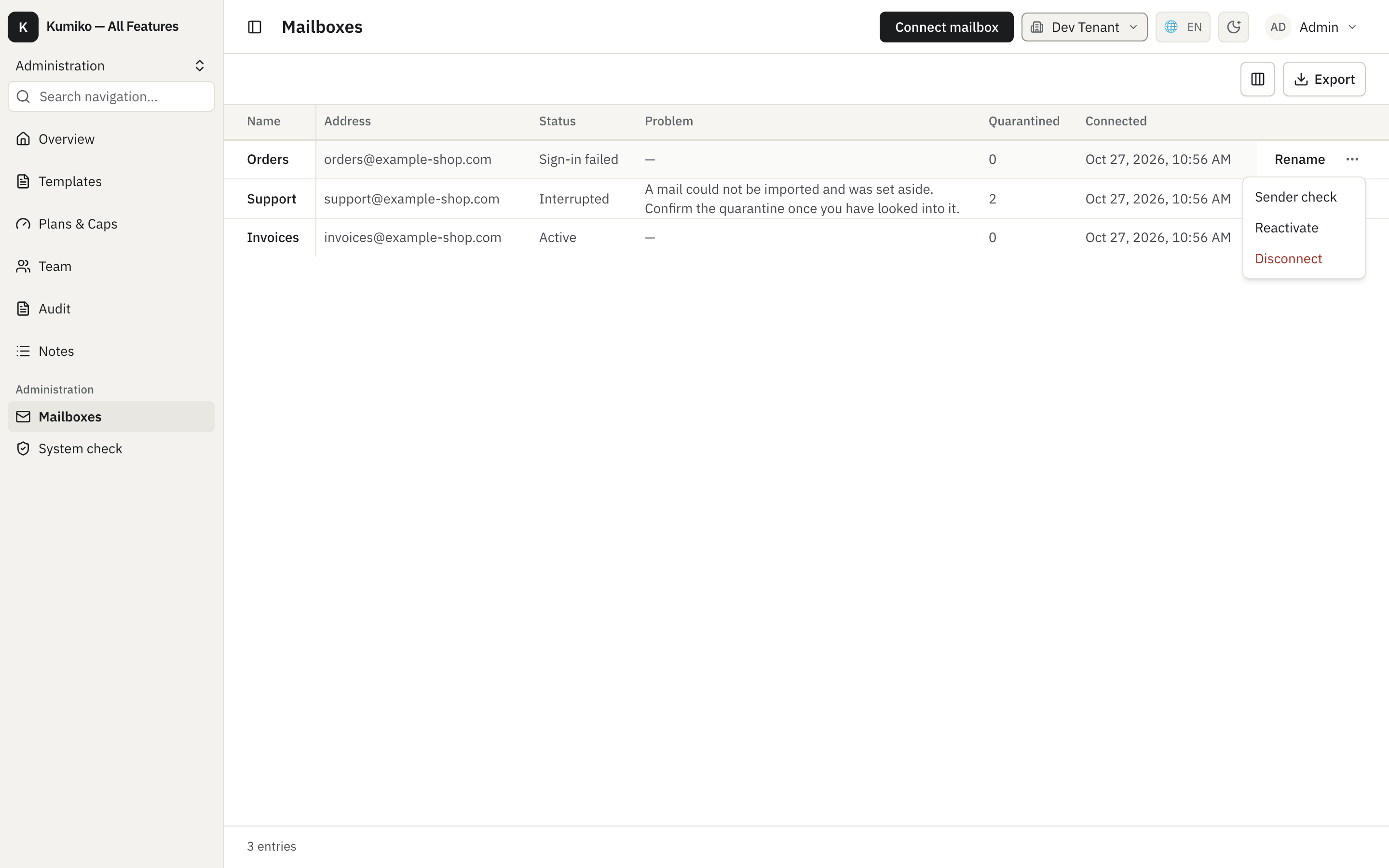
“Reactivate” opens the connect form for the same mailbox. The name stays read-only; the admin enters the new password and clicks “Check and reconnect”:
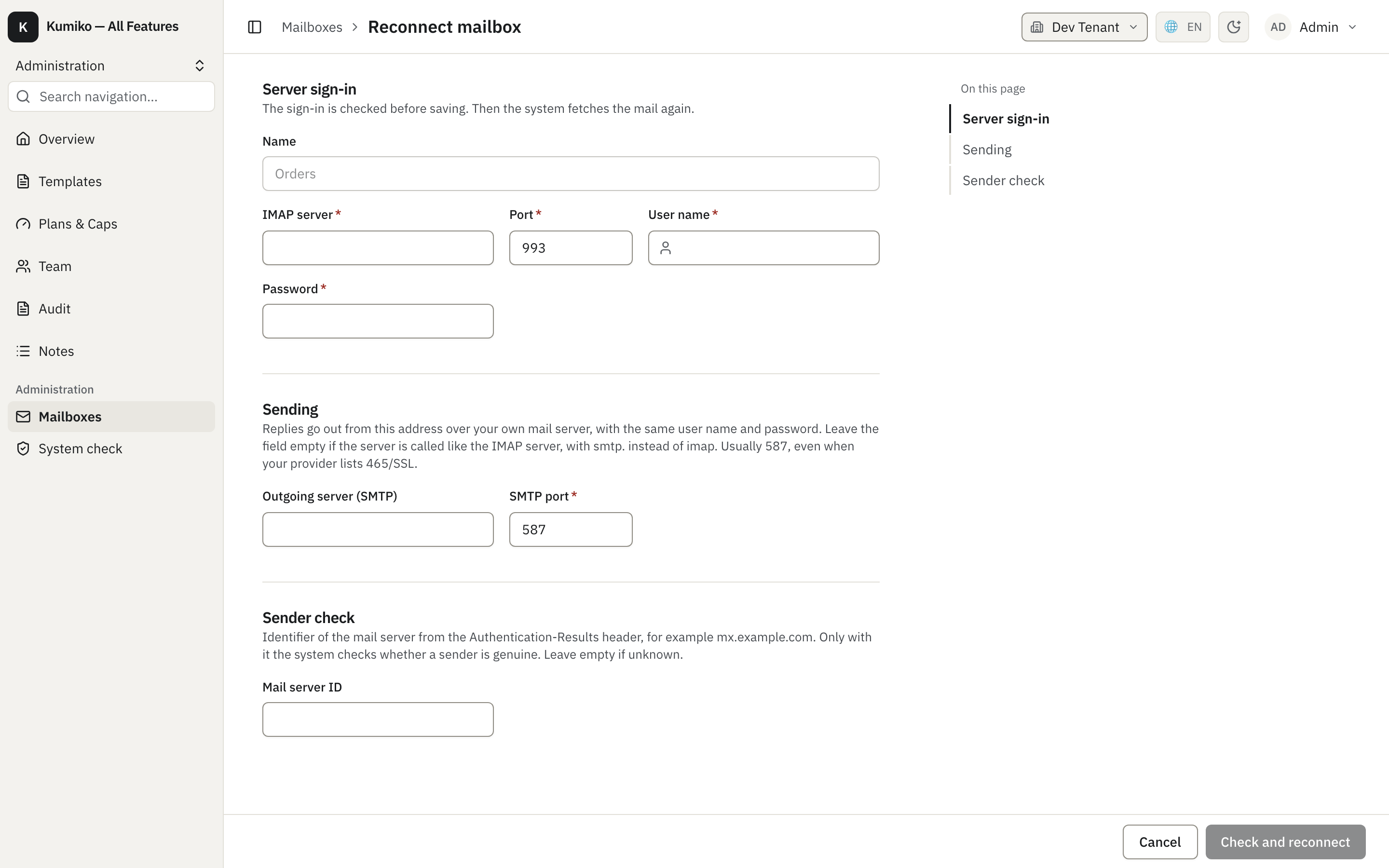
The sign-in is checked before anything is saved. The mailbox keeps its id, so the cursor, the threads and already imported mails stay where they are, and fetching resumes where it stopped. A disconnected mailbox comes back the same way.
Connect an IMAP mailbox
Section titled “Connect an IMAP mailbox”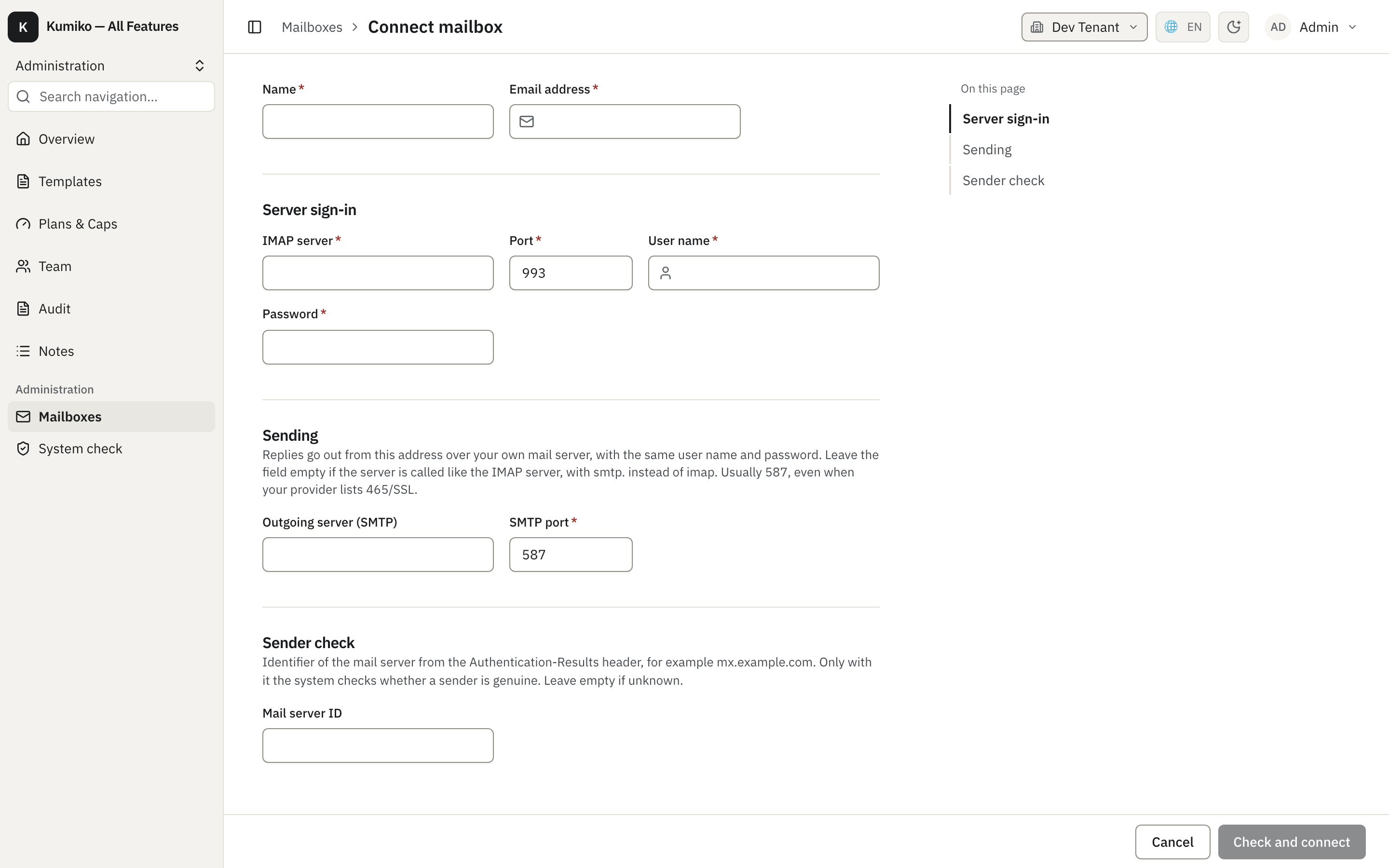
The form has three sections:
- Server sign-in: IMAP host, port 993, user and password.
- Sending: SMTP host and port, so replies leave from the same address with the same login. The form suggests 587 with STARTTLS, even when the provider lists 465/SSL.
- Sender check: the authserv-id of your own mail server (see below). Leave it empty if you do not know it.
“Check and connect” signs in before saving. Connecting is rate limited to 10 attempts per tenant in 10 minutes.
The system check runs one probe per connected mailbox and links a failed one back to this list; see System check.
For developers
Section titled “For developers”What a received mail carries
Section titled “What a received mail carries”Every mail produces exactly one inbound-message-received event (INBOUND_MESSAGE_RECEIVED_EVENT_QN). The aggregate id is derived from the mailbox and the provider message id, so a replay by the provider lands on the same stream. Next to sender, recipients and subject (PII-encrypted) the payload has:
| Field | Content |
|---|---|
bodyText, bodyTextTruncated | plain text body, at most 32,000 characters; longer text is cut and flagged |
bodyRef | file reference to the original .eml (or .html for HTML-only mails) |
attachmentFileIds | file-foundation ids, at most 50 attachments, each up to 25 MB and 50 MB per mail |
skippedAttachments | attachments that were not stored, with a reason such as too_large, mail_too_large or no_file_storage |
contentState | whether the content is complete or only a snippet was imported |
senderAuthentication | SPF, DKIM and DMARC as your own mail server reported them, or null |
Attachments outlive the mail: apps turn them into documents, so the retention sweep never deletes them.
When the provider delivered only a snippet (file storage was down, for example), the mail is imported anyway. A background pass fetches the content later and appends inbound-message-content-fetched on the same aggregate. The query message:content returns the current body and attachments for one mail.
React to mails
Section titled “React to mails”Process mails in a job triggered by the event. catchUp: true also runs the job for mails that arrived before the job existed, which is what you want for a new “create a ticket from each mail” feature:
import { INBOUND_MESSAGE_RECEIVED_EVENT_QN } from "@cosmicdrift/kumiko-bundled-features/inbound-mail-foundation";
r.job({  name: "tickets:from-mail",  trigger: { on: INBOUND_MESSAGE_RECEIVED_EVENT_QN, catchUp: true },  handler: async (payload, ctx) => {    // idempotent: delivery is at least once and catchUp replays history  },});
Adding catchUp to a running app runs the job for the whole history of every tenant. Side effects such as mails or webhooks must be safe for old events.
Quarantine
Section titled “Quarantine”A single broken mail must not block its mailbox, and an outage of the database or file storage must not quarantine good mail. The importer therefore sorts failures:
- A mail the provider cannot parse is quarantined as
unparseable; a mail the ingest handler rejects for good asinvalid_message. - Any other failure stops the batch before the cursor moves, and the mail is retried on the next poll. It counts only when a later mail of the same batch succeeded, so it is a problem of that mail and not of the system. The third counted failure quarantines it as
ingest_failed.
A quarantined mail counts as seen and the cursor moves on. The table store_mail_quarantine holds ids only, no mail content. The admin’s confirmation (acknowledge-quarantine) clears the count; confirmed entries are purged after 90 days.
The account’s lastError names the current problem: connection_failed, rate_limited, message_quarantined or file_storage_unavailable. After three failed polls in a row the mailbox counts as degraded.
Sender authentication
Section titled “Sender authentication”A mail can claim any From address. To tell a real customer from a forgery, the mailbox reads the Authentication-Results header its own mail server added. Only the topmost header whose authserv-id equals the mailbox’s trustedAuthservId counts; everything below it may come from the sender. Without a trusted id, without a matching header, or when the header was evaluated for another domain than the From domain, senderAuthentication is null.
import { isSenderAuthenticated } from "@cosmicdrift/kumiko-bundled-features/inbound-mail-foundation";
// true only when your own server reported a DMARC pass for the From domainif (!isSenderAuthenticated(payload.senderAuthentication)) {  return; // do not attach the mail to a customer automatically}
Send from a mailbox
Section titled “Send from a mailbox”sendMailFromAccount(ctx, { accountId, message }) sends through the mailbox’s own SMTP (or provider API). The message takes to, cc, subject, text or html, inReplyTo and references for threading, and attachmentFileIds (at most 10 files, 18 MB together).
import { sendMailFromAccount } from "@cosmicdrift/kumiko-bundled-features/inbound-mail-foundation";
const sent = await sendMailFromAccount(ctx, {  accountId,  message: {    to: ["mieter@example.de"],    subject: "Re: Heating in flat 3",    text: "We will send a technician on Thursday.",    inReplyTo: received.messageIdHeader,    attachmentFileIds: [invoiceFileId],  },});
A failure comes back as a write failure with a reason: mail_send_not_configured, mail_send_login_rejected, mail_send_server_unreachable, mail_send_rejected, mail_send_invalid_message, mail_send_attachment_invalid or mail_send_attachments_too_large. A disconnected mailbox and another user’s personal mailbox are reported as not found.
What the framework does not ship
Section titled “What the framework does not ship”The mailbox list, the connect and reconnect forms and the system check probe are framework screens. A message list, a message detail with attachments and a quarantine list belong to the app, because each app shows mails in its own context (a ticket, a tenant file, an invoice inbox).