Add TOTP-based 2FA to login
A password alone is one factor: something the user knows. TOTP-based
two-factor authentication (2FA) adds a second, something the user has
(an authenticator app that generates a 6-digit code every 30 seconds). The
auth-mfa feature adds enrollment, a two-step login challenge, and
recovery codes on top of auth-email-password, with almost no manual
wiring.
Mount the feature
Section titled “Mount the feature”Add auth-mfa to APP_FEATURES next to auth-email-password. Apps built
via runDevApp/runProdApp (the dev-server bootstrap) wire the login
status check, the
POST /auth/mfa/verify route with its own rate limiter, and (if sessions
is mounted) signing out every other session on enable/disable/regenerate.
import {  createAuthMfaFeature,  resolveMfaTokenSecrets,} from "@cosmicdrift/kumiko-bundled-features/auth-mfa";import { env } from "../env";
const mfaSecrets = resolveMfaTokenSecrets(env.JWT_SECRET, {  setupTokenSecret: env.MFA_SETUP_TOKEN_SECRET,  challengeTokenSecret: env.MFA_CHALLENGE_TOKEN_SECRET,});
export const APP_FEATURES = [  // ... other features  createAuthMfaFeature({    setupTokenSecret: mfaSecrets.setupTokenSecret,    challengeTokenSecret: mfaSecrets.challengeTokenSecret,    issuer: "Your App", // shown in the authenticator app next to the account label  }),];
Building buildServer directly instead of through the dev-server bootstrap?
See the Auth MFA recipe for the raw wiring
contract (mfaStatusChecker, auth.mfaVerifyHandler, the session-revoke
bind) that the bootstrap implements for you.
On the client, mount the login-challenge screen so a two-step login has somewhere to render:
import { emailPasswordClient } from "@cosmicdrift/kumiko-bundled-features/auth-email-password/web";import { authMfaClient, MfaVerifyScreen } from "@cosmicdrift/kumiko-bundled-features/auth-mfa/web";
createKumikoApp({  clientFeatures: [    emailPasswordClient({ mfaVerifyScreen: MfaVerifyScreen }),    authMfaClient(),    // ... other client features  ],});
auth-mfa requires user and
config; it’s auth-email-password that
must already be mounted for the login flow to make sense.
Security preflight
Section titled “Security preflight”- Keep
JWT_SECRET,MFA_SETUP_TOKEN_SECRET, andMFA_CHALLENGE_TOKEN_SECRETin the deployment secret store. Never commit, print, bundle, or reuse one secret for both MFA token purposes. - Explicit MFA overrides are optional. When they are absent or blank,
resolveMfaTokenSecretsderives two purpose-separated secrets fromJWT_SECRET; setup and challenge tokens remain distinct. - Stop before enabling tenant-wide enforcement until affected users have
enrolled.
adminsandallblock matching unenrolled users at login; there is no recovery-by-default for a rollout that locks everyone out.
Enable 2FA
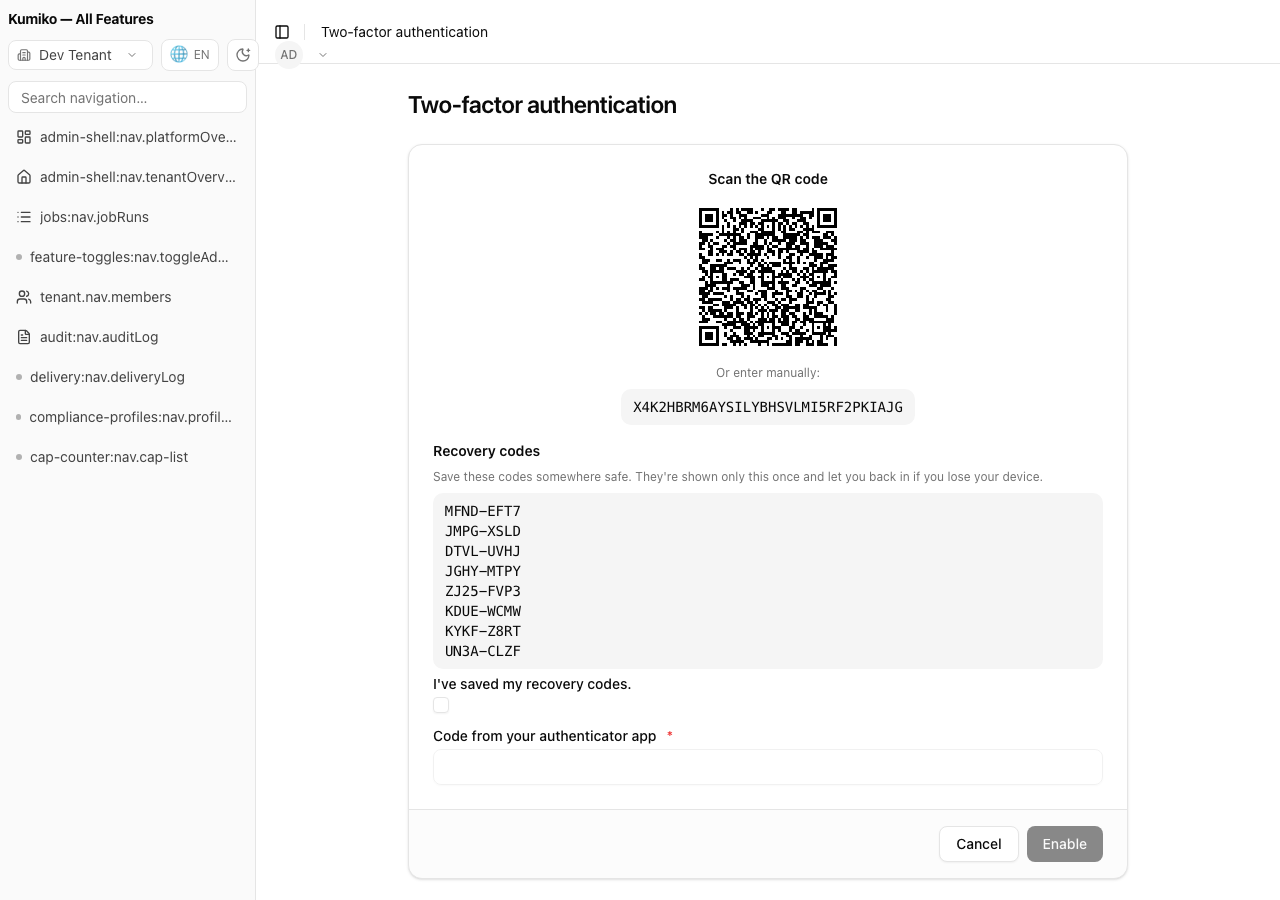
Section titled “Enable 2FA”Enrollment is a two-call, stateless flow, nothing is persisted until the user proves they scanned the QR code.
curl -sX POST https://app.example.com/api/write \ -H "Authorization: Bearer <jwt>" -H "Content-Type: application/json" \ -d '{ "type": "auth-mfa:write:enable-start", "payload": { "accountLabel": "jane@example.com" } }'{ "isSuccess": true, "data": { "setupToken": "…", "otpauthUri": "otpauth://totp/Your%20App:jane@example.com?secret=…&issuer=Your%20App", "recoveryCodes": ["ABCD-1234", "…8 total…"] }}Render otpauthUri as a QR code (the bundled enable screen does this for you)
and show the 8 recoveryCodes once, they are
never retrievable again. Confirm with a code from the now-scanned
authenticator app:
curl -sX POST https://app.example.com/api/write \ -H "Authorization: Bearer <jwt>" -H "Content-Type: application/json" \ -d '{ "type": "auth-mfa:write:enable-confirm", "payload": { "setupToken": "…", "code": "123456" } }'Only enable-confirm persists the user-mfa row, an abandoned
enable-start (user never scans, never confirms) leaves nothing behind.
Log in with 2FA
Section titled “Log in with 2FA”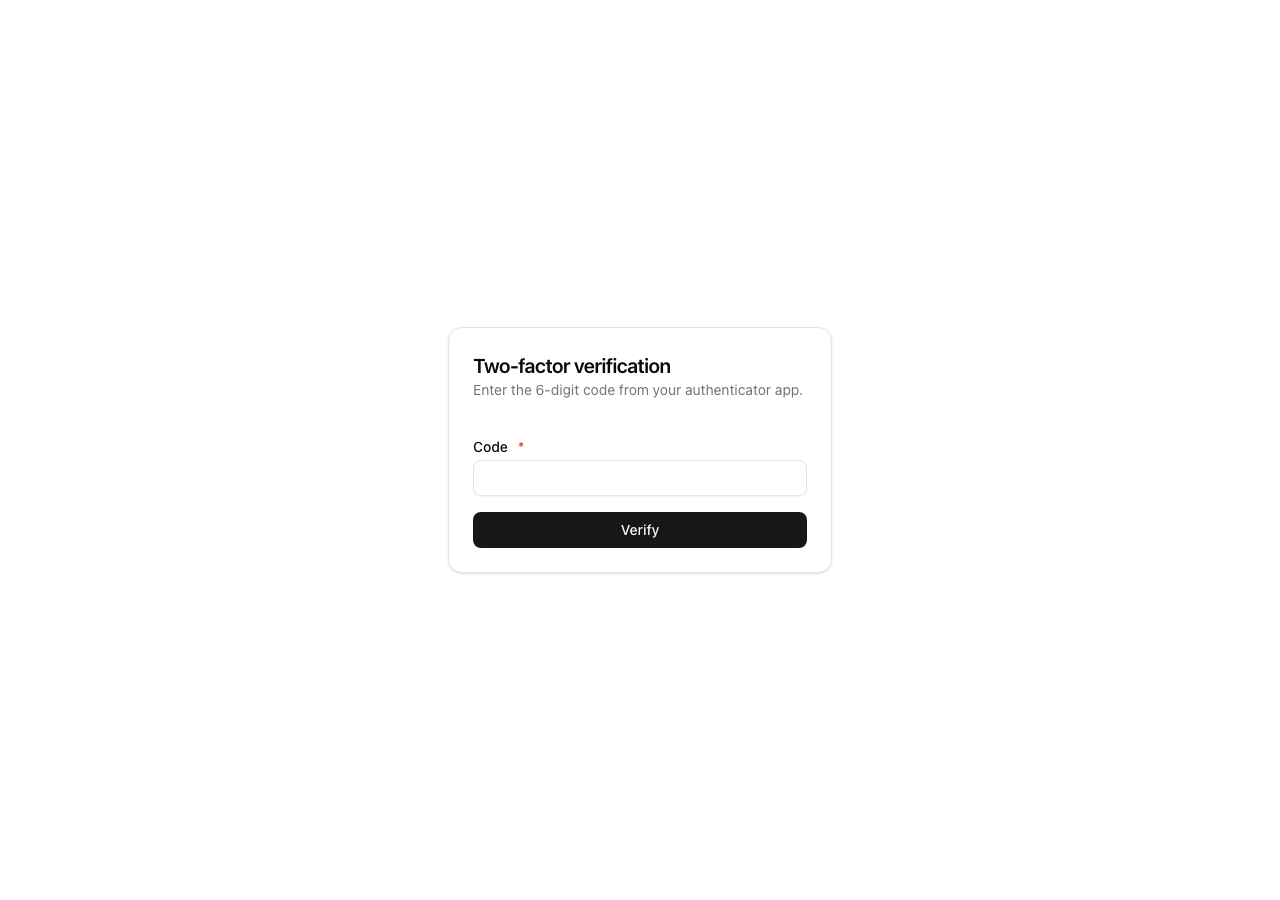
Once enrolled, POST /auth/login no longer returns a JWT directly for that
user, it returns a challenge:
{ "isSuccess": true, "mfaRequired": true, "challengeToken": "…" }Complete it with a TOTP code (or a recovery code) against the framework
route POST /auth/mfa/verify, not a dispatcher handler, since no JWT
exists yet:
curl -sX POST https://app.example.com/api/auth/mfa/verify \ -H "Content-Type: application/json" \ -d '{ "challengeToken": "…", "code": "123456" }'{ "isSuccess": true, "token": "<jwt>" }The challenge token is single-use and short-lived (10 minutes); a wrong code counts against a 5-attempt lockout independent of the login password-lockout counter.
Recovery codes
Section titled “Recovery codes”Each of the 8 codes generated at enrollment completes exactly one login
challenge in place of a TOTP code, then it’s burned. Regenerate the set
(invalidating all previous codes) via auth-mfa:write:regenerate-recovery
: useful after a user suspects a code leaked, or has used most of them.
Disable 2FA
Section titled “Disable 2FA”auth-mfa:write:disable requires a valid TOTP (or recovery) code, turning
off 2FA is itself a security-sensitive action, not a plain toggle.
Enforce 2FA tenant-wide
Section titled “Enforce 2FA tenant-wide”By default, enrollment is optional, users choose for themselves. A
tenant admin can require it via the auth-mfa:config:required config key
("optional" | "admins" | "all"). Setting "admins" or "all" blocks
login for a matching, unenrolled user, there is no in-band “enroll during
login” step yet, so roll this out with users already enrolled, or expect
support requests from anyone who isn’t.
What to know
Section titled “What to know”- Session revoke, not session kill. Enabling, disabling, or regenerating recovery codes signs out every other live session (stolen-session defense), never the session that made the change.
- Secrets are encrypted at rest. The TOTP secret is envelope-encrypted
via the same
MasterKeyProviderassecrets/config, no separate crypto story, and it rotates through the same KEK-rotation job (auth-mfa:reencrypt). - GDPR coverage is a separate feature. Mount
auth-mfa-user-dataalongsideuser-data-rightsto include 2FA enrollment status in data exports and hard-delete it on an erasure request, kept separate so plainauth-mfaconsumers don’t pull in the GDPR pipeline as a hard dependency.
See also
Section titled “See also”auth-mfareference, dependencies, config keys, and provided write commands.- Auth MFA recipe, the raw
buildServer({ auth: ... })wiring contract, runnable with integration tests. sessions, the revocable-session featureauth-mfahooks into for “sign out every other session.”