Assign a tier to a tenant manually (without billing)
When you onboard a partner, run a beta cohort, or fix a botched payment,
you need to grant a tenant a tier without a billing purchase going through.
The tier-engine feature ships a SystemAdmin-only handler and a built-in
admin screen for exactly that.
Treat this as a cross-tenant administrative action. Confirm the target tenant and intended tier before saving, and retain the audit trail for the operator change.
What you get
Section titled “What you get”- A SystemAdmin sitting in their own tenant can assign a tier to any tenant. The handler creates a system identity for the target tenant and performs the cross-tenant write through the tier-engine executor.
- The grant is stamped
source: "manual"so the next time your Stripe → tier sync runs, it leaves the operator-set tier alone. - The resolver cache that gates
r.toggleable()features is updated synchronously in the same request, so a toggleable feature unlocked by the tier is reachable immediately. - The app mounts the built-in admin screen; no custom UI is required.
Operator flow
Section titled “Operator flow”From the SystemAdmin’s perspective:
- Open the app’s sysadmin workspace.
- Pick Tier admin from the nav (or open it directly via the
qualified screen ref
tier-engine:screen:tier-admin). - Pick the target tenant and the tier name from the dropdown, the
options come from your app’s
TierMap, not from a hard-coded list. - Save. The grant is live before the next request.
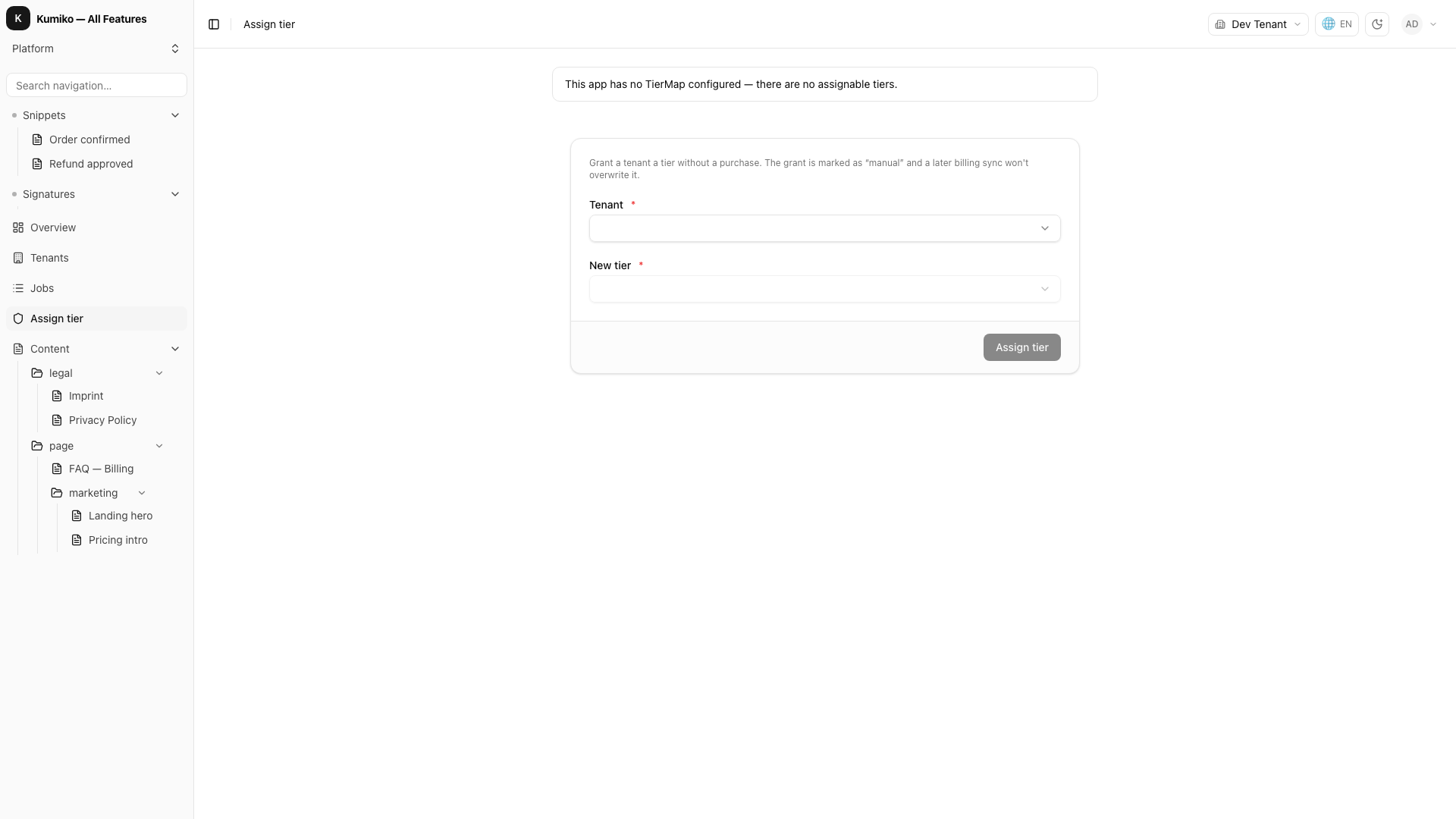
Wiring it up
Section titled “Wiring it up”A real app configures the tier-engine with its own TierMap. The map
defines which tier names exist and what each tier unlocks. Mount the
admin screen via r.nav so it appears in the SystemAdmin workspace.
The bundled feature owns the handler, queries, and screen:
// Tier Admin Sample//// Shows the SystemAdmin-only operator flow: assigning a tier to *any*// tenant without a billing purchase. The app side is intentionally tiny —// the recipe is the bundled tier-engine itself, configured with the app's// own TierMap. The integration test exercises the cross-tenant grant// (set-tenant-tier), the read-back (get-tenant-tier returning// source:"manual"), and the option-list (tier-options) end-to-end.
import {  createTierEngineFeature,  type TierMap,} from "@cosmicdrift/kumiko-bundled-features/tier-engine";import { defineFeature } from "@cosmicdrift/kumiko-framework/engine";
// --- App caps ---//// Each app picks its own cap dimensions. Here a tiny example: how many// notes a tenant may keep. The TierMap is generic in this cap-shape so// downstream code stays type-safe end-to-end.
export type AppCaps = { readonly maxNotes: number };
// --- The toggleable feature a paid tier unlocks ---//// A `r.toggleable()` feature shows up in a tenant's effective-features set// exactly when its tier lists it. "pro" lists it below; "free" does not.// This is what makes the cache-sync invariant observable: granting "pro"// must light this feature up in the resolver the same request, not after a// refresh, replay, or restart.
export const NOTES_EXPORT_FEATURE = "notes-export";
export const notesExportFeature = defineFeature(NOTES_EXPORT_FEATURE, (r) => {  r.toggleable({ default: false });});
// --- Tier map ---//// "free" + "pro" — the operator picks one of these names when granting// a tier manually. "pro" unlocks the notes-export toggleable feature; the// integration test grants "pro" and then reaches that feature in the same// request, proving the cache-sync invariant end-to-end.
export const appTierMap: TierMap<AppCaps> = {  free: { features: [], caps: { maxNotes: 5 } },  pro: { features: [NOTES_EXPORT_FEATURE], caps: { maxNotes: 100 } },};
// --- Configured tier-engine ---//// `defaultTier: "free"` means every new tenant starts on free via the// `inTransaction` entity hook the tier-engine registers — no app code// needed. `tierMap` makes `tier-options` return ["free", "pro"] so the// tier-admin screen can populate its picker without hard-coding.
export const tierEngineForApp = createTierEngineFeature<AppCaps>({  defaultTier: "free",  tierMap: appTierMap,});
Surface the admin screen from your app shell:
// In an app feature that owns the sysadmin navigation:r.nav({ workspace: "sysadmin", screen: "tier-engine:screen:tier-admin", title: "Tier admin",});The screen ref must be qualified (tier-engine:screen:tier-admin)
because the screen is owned by the bundled feature, not by the app
feature that mounts it.
The cache-sync invariant
Section titled “The cache-sync invariant”set-tenant-tier writes through the event-store executor, which does not fire
the tier-assignment postSave hook. The handler therefore calls onAssigned
to update the resolver cache in the same request.
The recipe’s integration test covers the grant, read-back through
get-tenant-tier, and the tier-options list through the real dispatcher.
See also
Section titled “See also”- Recipe: tier-admin sample, runnable example with integration tests covering grant + idempotent re-grant + role-fail-closed.
- Reference: tier-engine : full handler/query inventory plus the resolver-extension setup.