Wiring up AI
This guide is for the developer who deploys an app with ai-foundation and for the SystemAdmin who runs it. It says where each value comes from and which screen shows what is wrong.
Where a standard model comes from
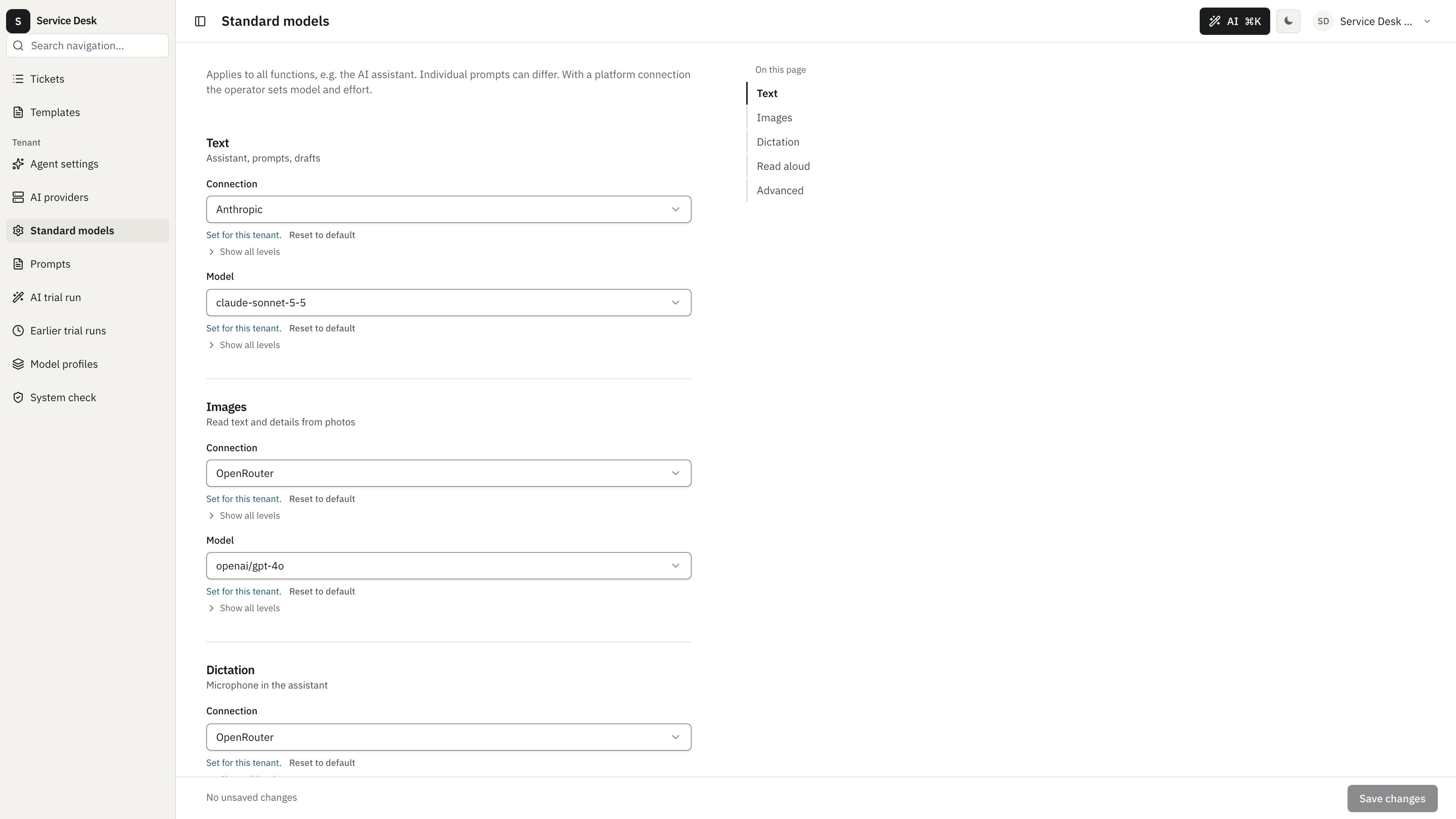
Section titled “Where a standard model comes from”Each capability (text, images, dictation, read aloud) needs a connection and a model. The first source that has a value wins:
- The tenant row, set by a TenantAdmin in Standard models.
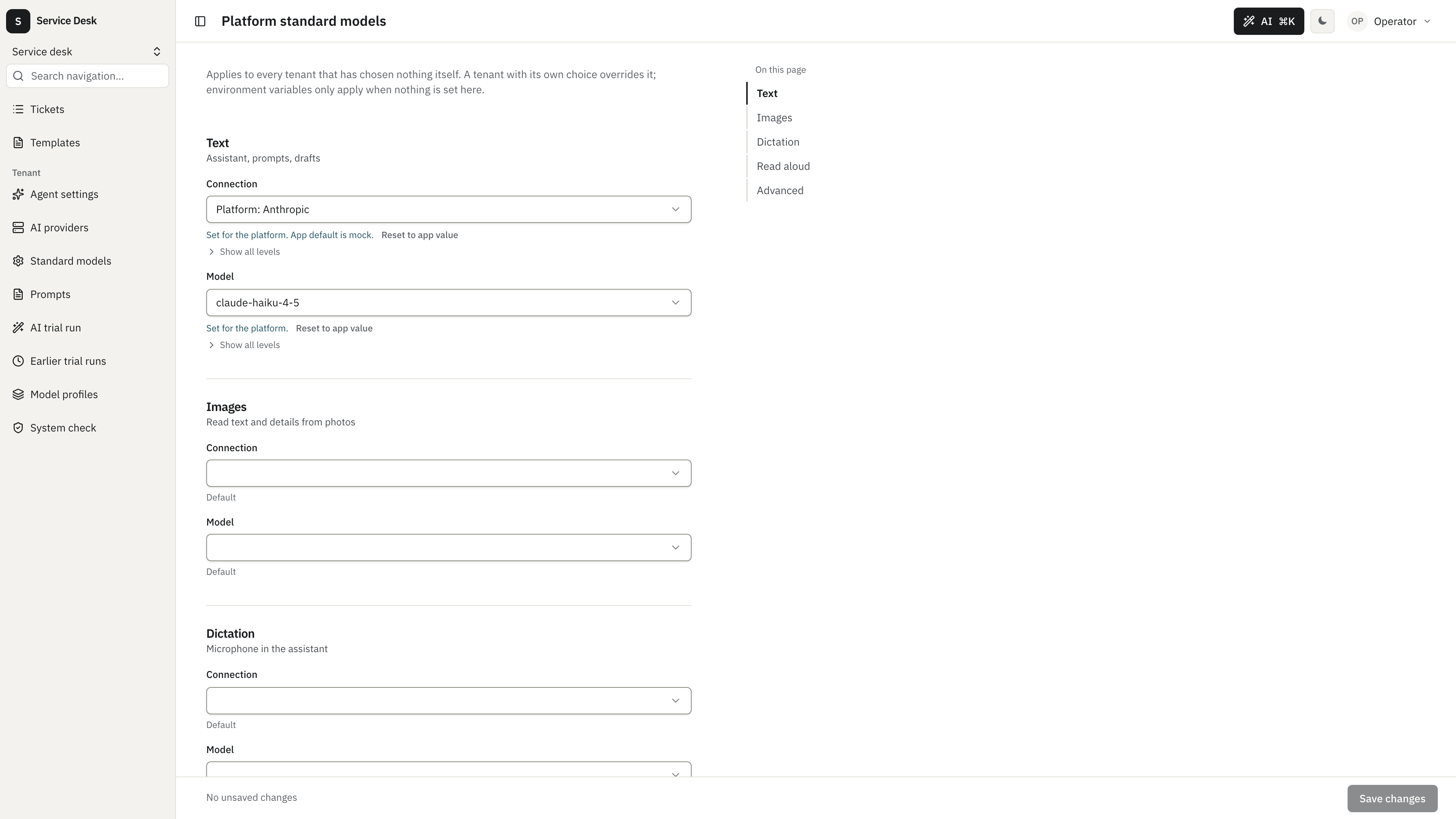
- The system row, set by the SystemAdmin in Platform standard models.
- Environment variables of the app.
- Nothing. The capability then reports
noModelSelected.
The environment variables are AI_TEXT_CONNECTION, AI_TEXT_MODEL, AI_IMAGE_CONNECTION, AI_IMAGE_MODEL, AI_TRANSCRIPTION_CONNECTION and AI_TRANSCRIPTION_MODEL. Read aloud has no environment variable; set it on one of the two screens. A connection value looks like platform:openrouter for a platform connection or is the id of a tenant’s own connection.
A tenant that stays on a platform connection cannot change the model or the effort. It gets what the system row or the environment says. To pick its own model, the tenant first adds a connection of its own in AI providers.
Platform key
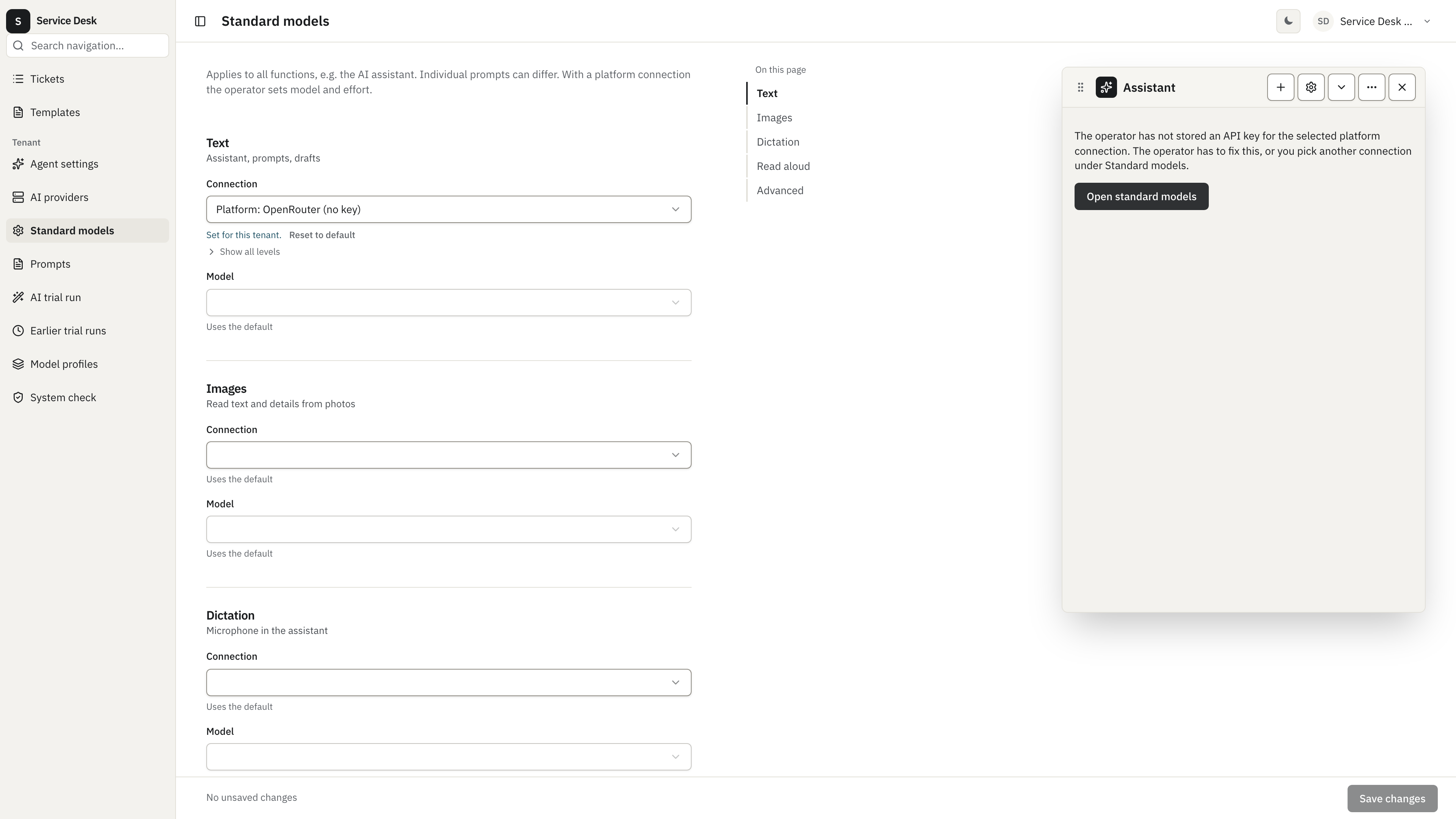
Section titled “Platform key”The SystemAdmin stores the platform keys in AI platform (Anthropic, OpenAI compatible, OpenRouter). The keys live as secrets of the system tenant and are never shown again. Without a key the platform connection is missing from every list. A reference to a platform connection without a key reports noKey.
The platform catalogs load on boot and on Refresh now in the platform row of AI providers. Only the SystemAdmin sees that button on platform rows.
EU/ZDR
Section titled “EU/ZDR”With enforceEuZdr: true every connection must run on an EU endpoint with zero data retention. When the OpenRouter address in AI platform is empty, the platform uses https://eu.openrouter.ai/api/v1 on its own; there is nothing to set. An address you enter yourself must lie on one of the euZdrEndpoints (default https://eu.openrouter.ai). Any other address stays refused, and the provider list says so.
What the assistant says
Section titled “What the assistant says”When text is not usable, the assistant shows a notice with a reason:
| Reason | Meaning | Fix |
|---|---|---|
noModelSelected | No connection or model for text in any of the sources above. | Set one in a standard models screen or in the environment. |
noKey | The chosen platform connection has no key. | Store the key in AI platform. |
noProviderCapable | No mounted provider can do text. | Mount a provider feature in the app. |
modelNotAllowed | The app limits which models a tenant may use on the platform key (resolvePlatformModels, often by plan), and this model is not among them. | Pick an allowed model or change the app rule. |
euZdrBlocked | EU/ZDR is required and the address is not an EU endpoint. | Clear the OpenRouter address or use the EU one. |
notConfigured | The connection is set up only in part. | Open the connection in AI providers. |
The button opens the screen where the reason can be fixed. A SystemAdmin goes to AI platform for noKey and euZdrBlocked and to Platform standard models for every other reason. A TenantAdmin goes to Standard models; for noKey and euZdrBlocked on a platform connection the text says the operator has to fix it, and with noKey it adds that the tenant can pick another connection there. Other users only read that an admin has to set this up.
App screens that use AI show the same notice with useTextSetupGap(enabled) and <AgentSetupNotice gap={gap} /> from @cosmicdriftgamestudio/kumiko-ai-agent/web. The hook returns null when text works, otherwise a TextSetupGap with reason and adminCanFix.
What the provider list says
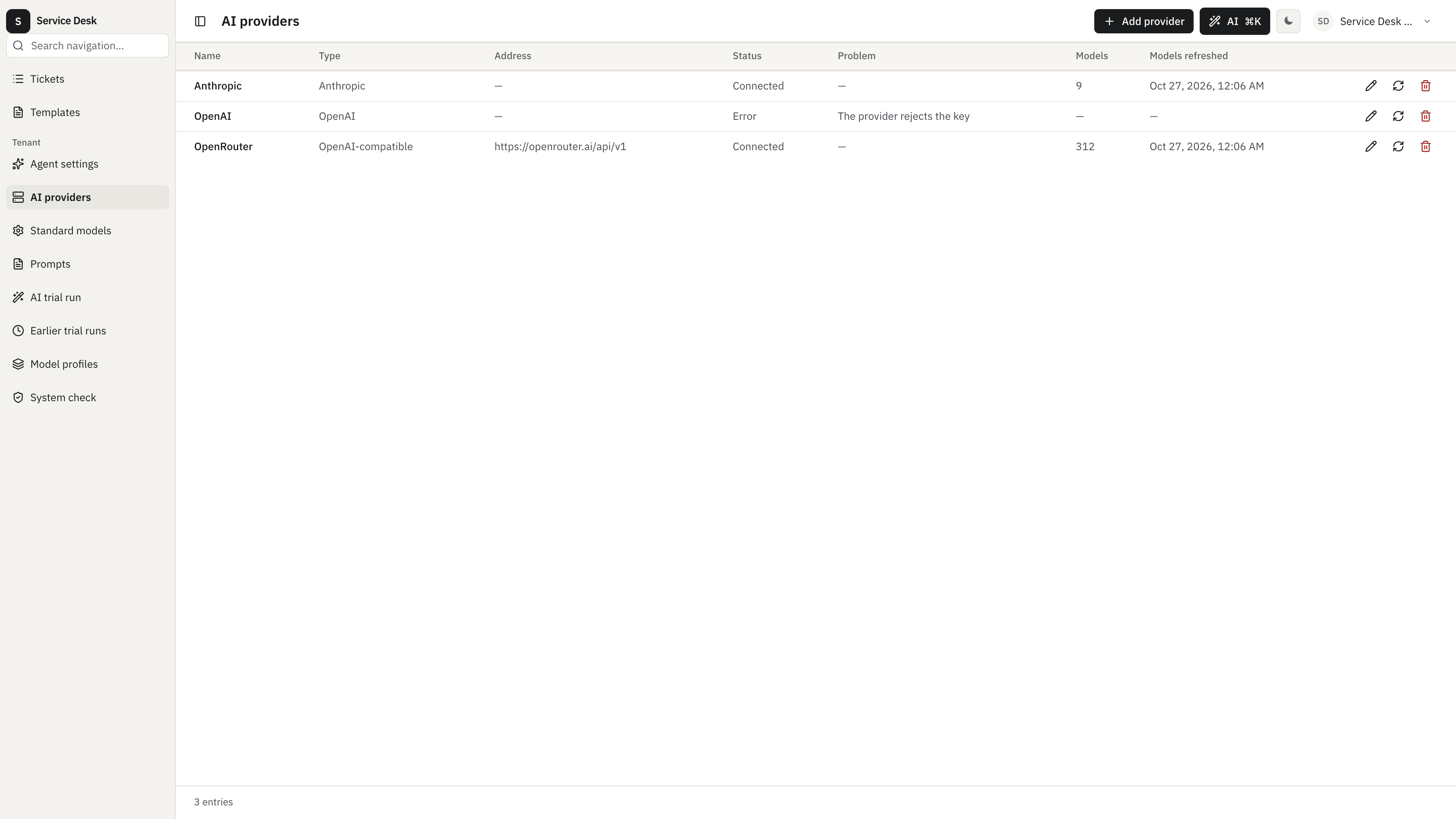
Section titled “What the provider list says”AI providers shows a problem column next to the status. Every load checks a platform row against the current settings, so an address refused under EU/ZDR shows up without a refresh. A platform slot with a key but an invalid address appears only for the SystemAdmin, with endpointInvalid. A slot without a key does not appear at all. A TenantAdmin sees problems of platform rows worded as something the operator has to fix. The reasons are fixed texts and never contain the key:
| Problem | Meaning |
|---|---|
euZdrEndpointNotAllowed | EU/ZDR is required, the address is not an EU endpoint. |
keyMissing | No key stored. |
keyRejected | The provider answered 401 or 403. |
endpointInvalid | The address is not a valid public URL. |
unreachable | The provider could not be reached. |
listingFailed | The model list could not be loaded for another reason. |
Who uses which screen
Section titled “Who uses which screen”| Screen | Role | Purpose |
|---|---|---|
| AI platform | SystemAdmin | Platform keys, addresses, monthly limits per tenant. |
| Platform standard models | SystemAdmin | Default models for every tenant without its own choice. |
| AI providers | TenantAdmin, SystemAdmin | Own connections, status and problem of every connection. |
| Standard models | TenantAdmin | The tenant’s own choice. |
An app that has a platform workspace adds the nav entry PLATFORM_STANDARD_MODELS_NAV_QN to it. The screen ids for links are PLATFORM_STANDARD_MODELS_SCREEN_ID and STANDARD_MODELS_SCREEN_ID from @cosmicdriftgamestudio/kumiko-ai-foundation/web.
Checking a running installation
Section titled “Checking a running installation”The framework’s System check (/main/system-check) runs probes against the real services. ai-foundation adds ai-connections, ai-standard-models (tenant), ai-platform-connections (system) and the paid ai-extract-test-invoice, which runs only from More actions and skips tenants on the platform connection. document-ingest-provider-liteparse adds parse-scan and document-ingest-provider-einvoice adds read-xrechnung, both system probes. Failure texts reuse the reasons of the provider list above.
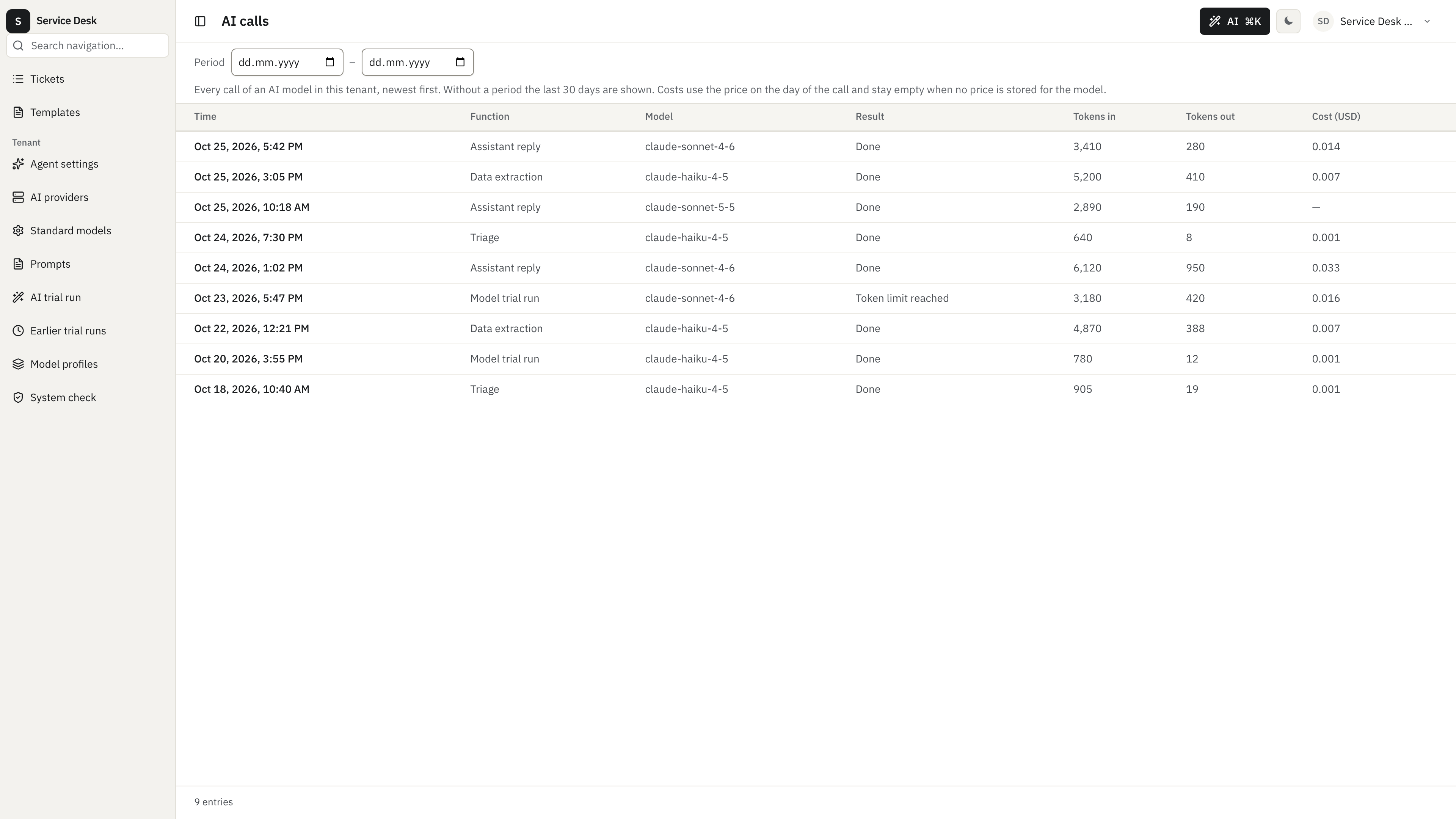
AI calls shows every model call of the tenant with tokens and cost. createAiFoundationFeature({ aiCalls: { costs: "hidden" } }) removes the costs for every caller; handlerLabels names the app’s handlers in the “Function” column.
The ai-agent-basic sample shows both screens with more detail, the 0.65.0 migration of old provider ids, and the assistant side of this setup.