The Assistant: talk to your app
Enterprise ai-agent and its ai-agent-edit add-on ship in the commercial Kumiko Enterprise offering. The exposure rules they build on (agent-tools) live in the open framework.
Every app in this stack already carries a precise description of itself: entities,
fields, handlers, screens, navs, labels. ai-agent opens a chat layer on top of the
running app and hands the model that description. The result is not a chatbot bolted
onto a support page, it is a second way to operate the app you already have. Ask a
question and it queries. Ask for a change and it proposes one, and a human answers.
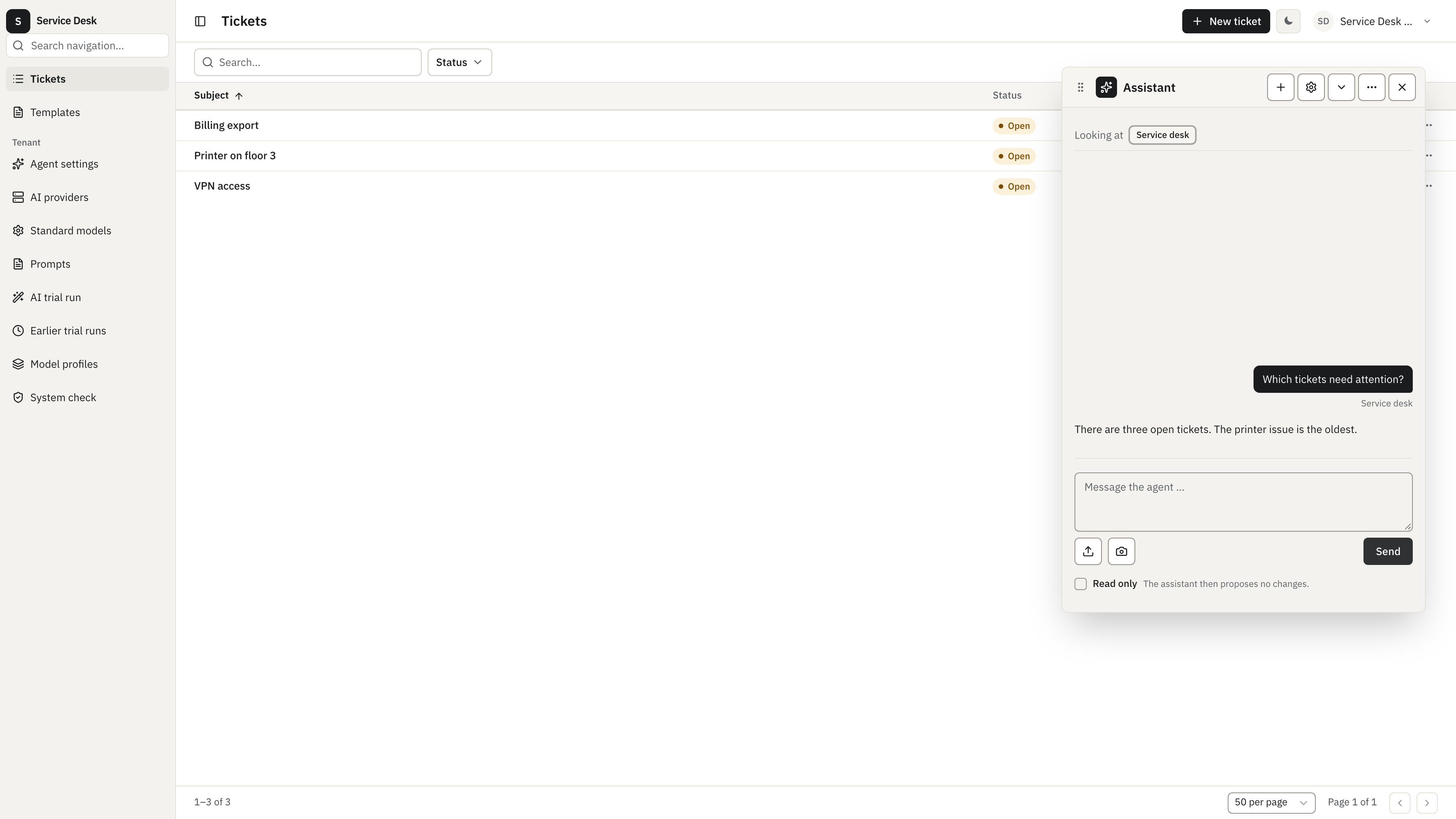
Nothing on this page is a special integration. The screenshots come from the runnable service-desk sample linked below, with the agent mounted next to an ordinary ticket feature. The sample uses a deterministic mock provider for repeatable documentation runs; replace it with a production provider in a real tenant.
Thirty seconds in a running app
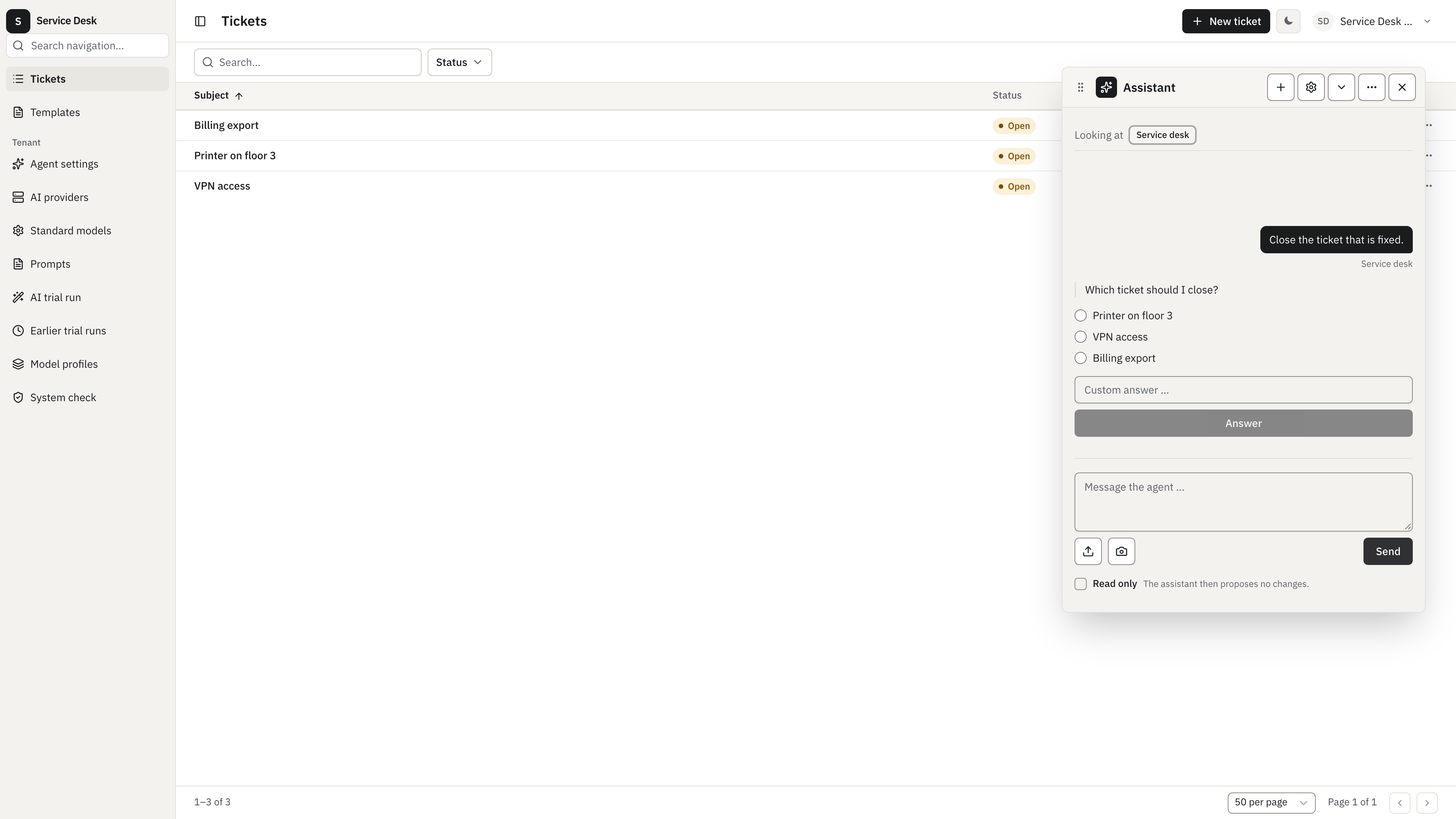
Section titled “Thirty seconds in a running app”The user is on the ticket list and types one sentence: close the ticket that is fixed. The handler needs a specific ticket and the sentence names none. So it does not guess, it asks, offering the tickets it can actually see plus a free-text answer:
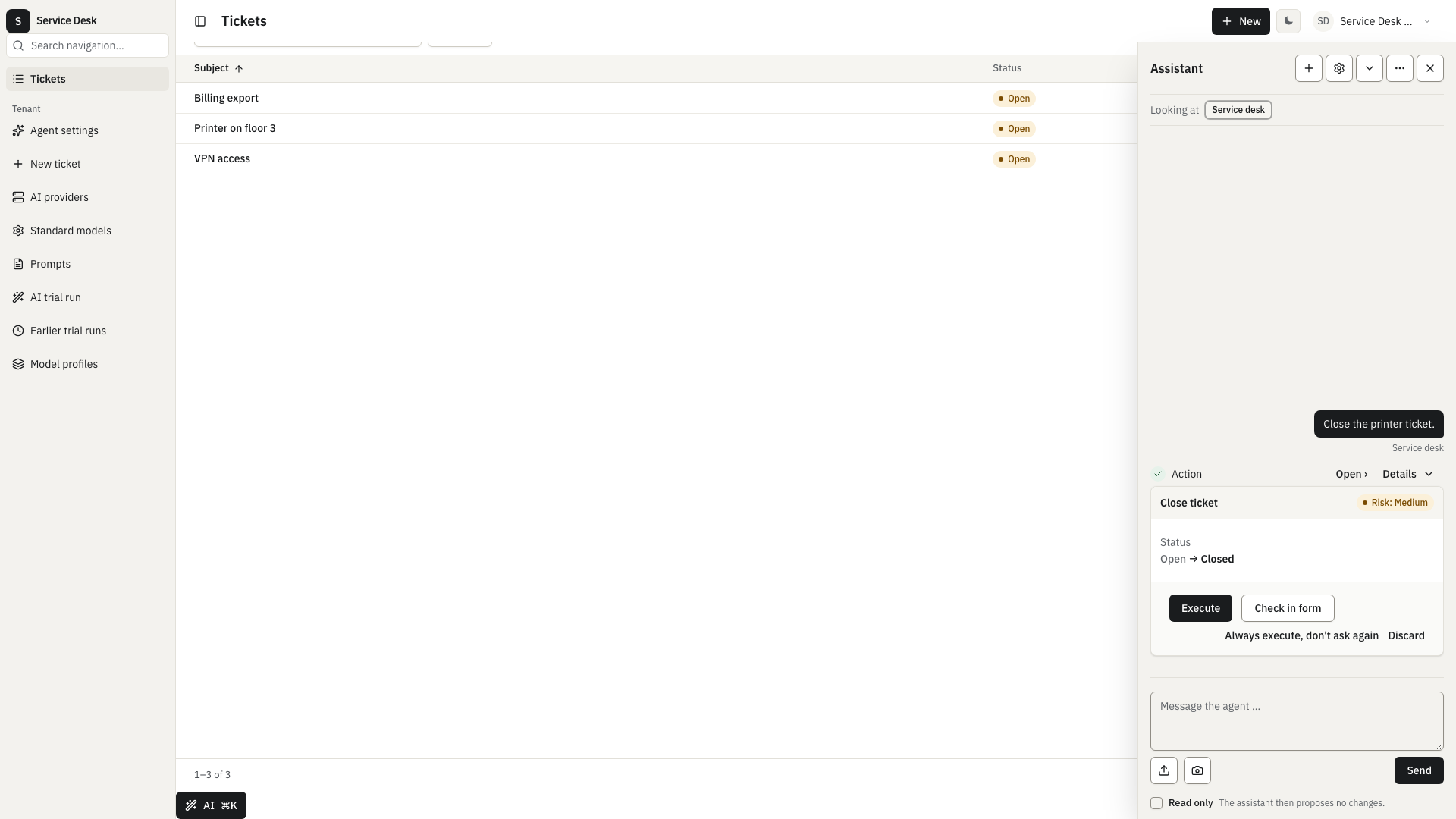
With the answer in hand it still does not write. In the default mode a write can only become a proposal card titled “What will happen”: the steps in plain words, each with its details, and one approval for the whole plan.
“Edit in the form” in a step’s details makes an unfamiliar action safe to accept. The app’s own close-ticket form opens, pre-filled with the proposed status. The user reads the values before anything is written. Note the context chip at the top of the layer: it followed the user onto the form.
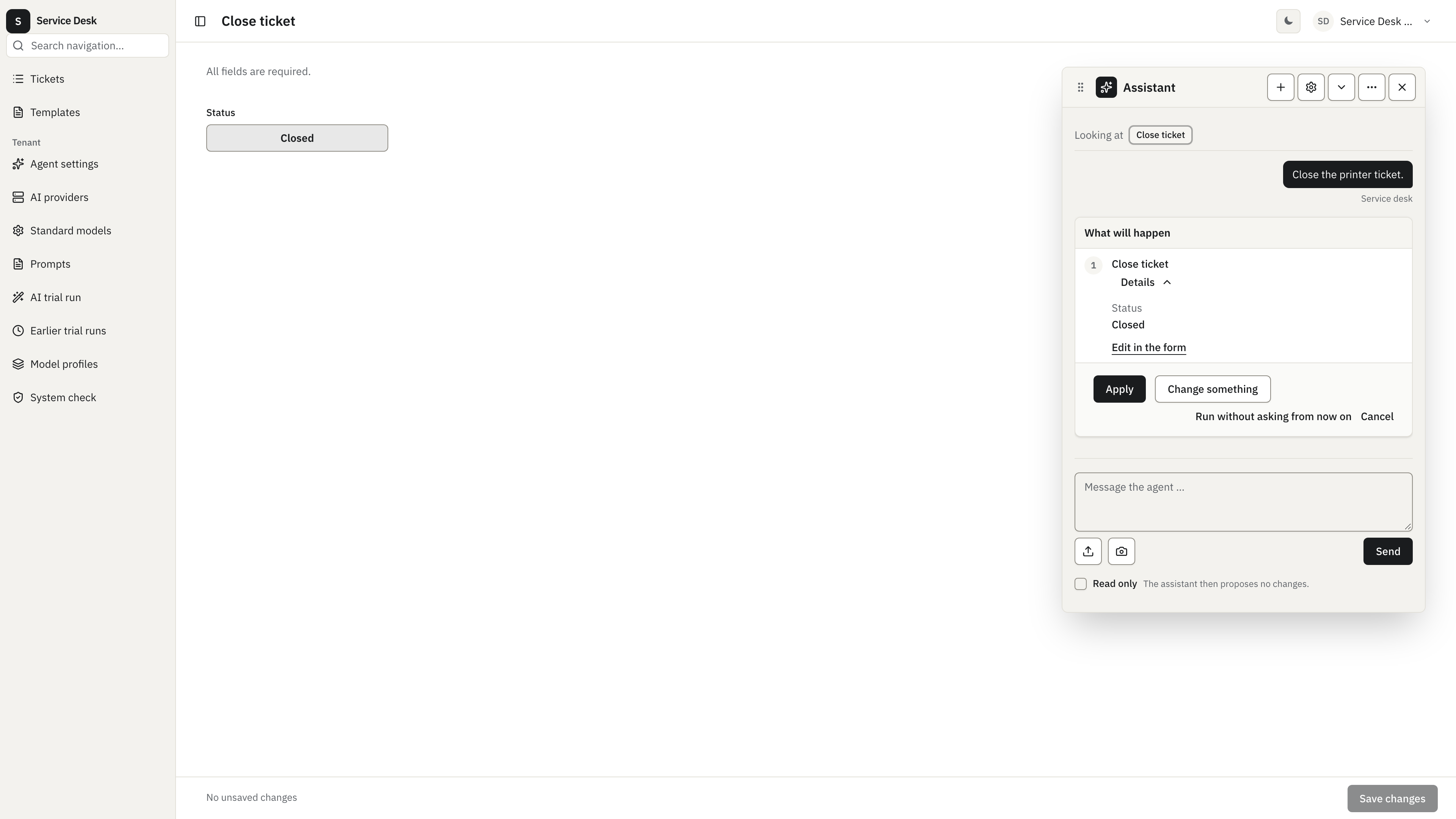
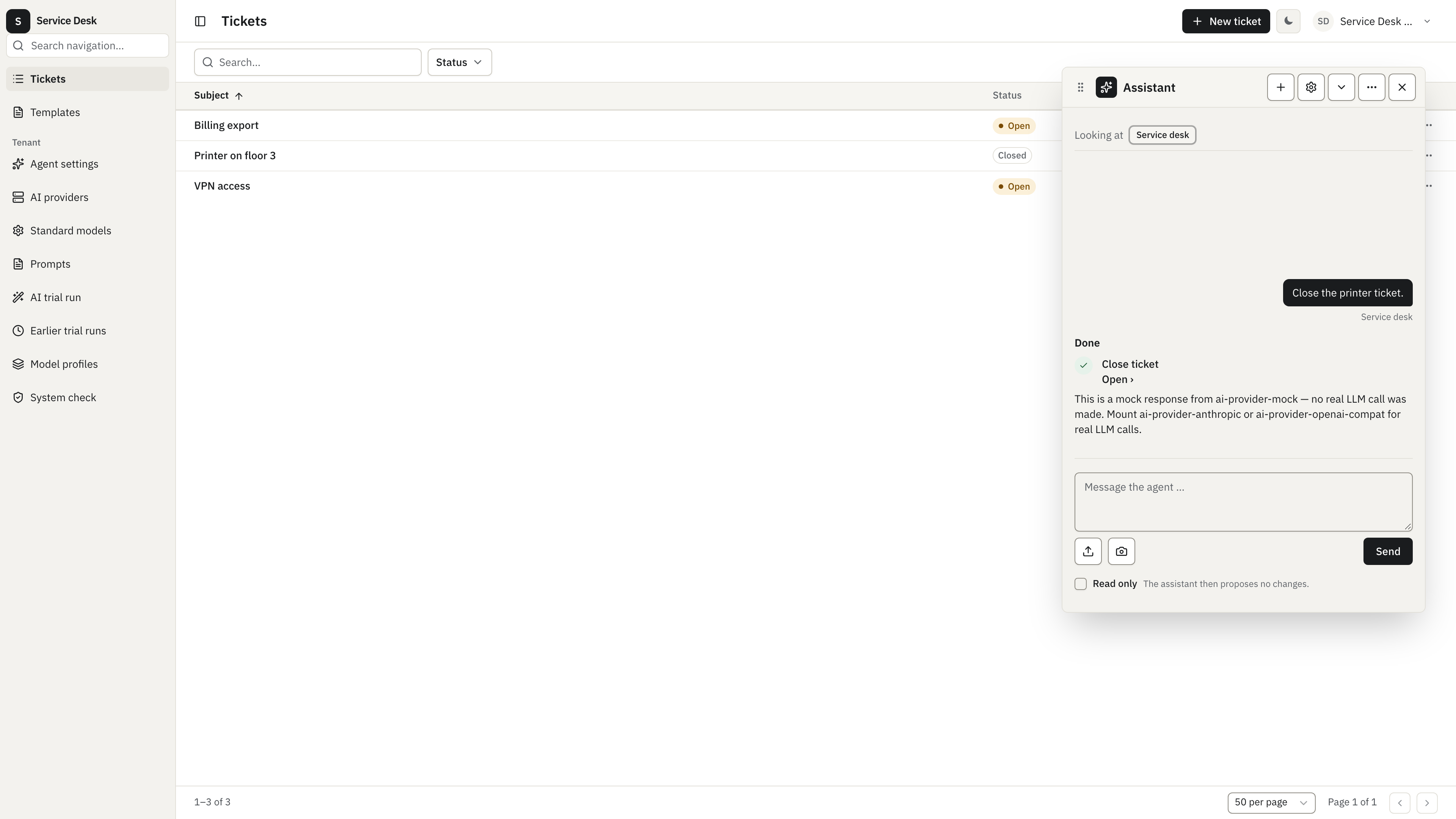
Saving the form, or answering “Apply” on the card, dispatches the handler once. The card collapses to a done state and the conversation continues:
It already knows your app
Section titled “It already knows your app”There is no second source of truth to maintain. The tool catalog is built from the
registry the server actually composed, per request and per caller. What a feature
owes the model is one sentence per handler, because exposure is fail-closed: a
handler without a description stays invisible no matter which roles the caller
has. The recipe’s service-desk feature is a complete example, a described entity,
per-verb descriptions on generated CRUD, and two custom writes that declare how
dangerous they are:
// AI-Agent Basic Sample// Shows: what a domain feature has to say about itself before the in-app// agent can use it. Agent exposure is fail-closed — a handler without a// `description` stays invisible to the model no matter which roles the// caller has — so every handler here carries one, and the two custom// writes additionally declare how dangerous they are via `agent.risk`.
import {  createEntity,  createEntityExecutor,  createNumberField,  createSelectField,  createTextField,  defineFeature,  templateVariable,} from "@cosmicdrift/kumiko-framework/engine";import { failNotFound, failTransition } from "@cosmicdrift/kumiko-framework/errors";import type {  EntityEditScreenDefinition,  EntityListScreenDefinition,} from "@cosmicdrift/kumiko-framework/ui-types";import { z } from "zod";
export const FEATURE_NAME = "service-desk";
export const TICKET_CLOSE_QN = `${FEATURE_NAME}:write:ticket:close`;export const TICKET_PURGE_QN = `${FEATURE_NAME}:write:ticket:purge`;
type TicketStatus = "open" | "closed" | "purged";
// The entity needs a description too: once a described handler makes it// reachable, the agent has to be able to explain the schema it is filling.export const ticketEntity = createEntity({  table: "read_sample_service_desk_tickets",  description: "A customer support ticket: one subject line and its lifecycle status.",  fields: {    number: createTextField({      searchable: true,      personal: false,      reason: "support_ticket_number_is_business_data",    }),    subject: createTextField({      required: true,      searchable: true,      filterable: true,      sortable: true,      personal: false,      reason: "support_ticket_subject_is_business_data",    }),    status: createSelectField({ options: ["open", "closed", "purged"] as const, filterable: true }),  },});
// `version` is required rather than optional so the tool catalog strips it// from the model-facing schema and dispatch injects the current one — the// model never sees a version it could go stale on.const ticketCloseActionSchema = z.object({  id: z.uuid(),  version: z.number(),  status: z.literal("closed").default("closed"),});const ticketPurgeActionSchema = z.object({ id: z.uuid(), version: z.number() });
const variableParagraph = (before: string, variable: string, after: string): string =>  `<p>${before}<span data-variable="${variable}"></span>${after}</p>`;
const TICKET_REPLY_BODY = {  en: [    variableParagraph("Your ticket ", "number", " is being handled."),    variableParagraph("Subject: ", "title", ""),    variableParagraph("Current status: ", "status", ""),  ].join(""),  de: [    variableParagraph("Ihr Ticket ", "number", " wird bearbeitet."),    variableParagraph("Betreff: ", "title", ""),    variableParagraph("Aktueller Status: ", "status", ""),  ].join(""),} as const;
const writeAccess = { roles: ["Admin", "TenantAdmin"] } as const;const readAccess = { roles: ["User", "Member", "Admin", "TenantAdmin"] } as const;
export const ticketEditScreen: EntityEditScreenDefinition = {  id: "ticket-edit",  type: "entityEdit",  entity: "ticket",  layout: {    sections: [      {        title: "service-desk:section.ticket",        columns: 2,        fields: [{ field: "subject", span: 2 }],      },    ],  },};
export const ticketListScreen: EntityListScreenDefinition = {  id: "ticket-list",  type: "entityList",  entity: "ticket",  columns: ["subject", "status"],  defaultSort: { field: "subject", dir: "asc" },  createLabel: "service-desk:actions.new",  rowActions: [    { kind: "navigate", id: "edit", label: "service-desk:actions.edit", screen: "ticket-edit" },  ],};
export const serviceDeskFeature = defineFeature(FEATURE_NAME, (r) => {  r.translations({    keys: {      "service-desk:nav.tickets": { en: "Tickets", de: "Tickets" },      "service-desk:actions.new": { en: "New ticket", de: "Neues Ticket" },      "service-desk:workspace.main": { en: "Service desk", de: "Service-Desk" },      "service-desk:actions.edit": { en: "Edit", de: "Bearbeiten" },      "service-desk:section.ticket": { en: "Ticket", de: "Ticket" },      "screen:ticket-list.title": { en: "Service desk", de: "Service-Desk" },      "screen:ticket-edit.title": { en: "Edit ticket", de: "Ticket bearbeiten" },      "service-desk:entity:ticket:field:number": { en: "Number", de: "Nummer" },      "service-desk:entity:ticket:field:subject": { en: "Subject", de: "Betreff" },      "service-desk:entity:ticket:field:status": { en: "Status", de: "Status" },      "service-desk:entity:ticket:field:status:option:open": { en: "Open", de: "Offen" },      "service-desk:entity:ticket:field:status:option:closed": { en: "Closed", de: "Geschlossen" },      "service-desk:entity:ticket:field:status:option:purged": { en: "Purged", de: "Gelöscht" },      "screen:ticket-close-form.title": { en: "Close ticket", de: "Ticket schließen" },      "service-desk:entity:__action-form__:field:id": { en: "Ticket ID", de: "Ticket-ID" },      "service-desk:entity:__action-form__:field:version": { en: "Version", de: "Version" },      "service-desk:entity:__action-form__:field:status": { en: "Status", de: "Status" },      "service-desk:entity:__action-form__:field:status:option:closed": {        en: "Closed",        de: "Geschlossen",      },      "service-desk:feature.label": { en: "Service desk", de: "Service-Desk" },      "service-desk:notify.ticket-reply.label": { en: "Ticket reply", de: "Ticket-Antwort" },      "service-desk:mail.variable.title": { en: "Ticket subject", de: "Betreff des Tickets" },      "service-desk:mail.variable.number": { en: "Ticket number", de: "Ticketnummer" },      "service-desk:mail.variable.status": { en: "Ticket status", de: "Status des Tickets" },    },  });
  const { table, executor } = createEntityExecutor("ticket", ticketEntity);
  // Without this guard a mid-risk close could undo a high-risk purge, which is  // exactly what the risk tiers are meant to prevent.  const transitionTicket = async (    payload: { readonly id: string; readonly version: number },    to: TicketStatus,    allowedFrom: readonly TicketStatus[],    user: Parameters<typeof executor.update>[1],    db: Parameters<typeof executor.update>[2],  ) => {    const [current] = await db.selectMany(table, { id: payload.id }, { limit: 1 });    if (!current) return failNotFound("ticket", payload.id);    const from = String(current["status"]);    if (!allowedFrom.some((allowed) => allowed === from)) {      return failTransition(from, to, allowedFrom);    }    return executor.update(      { id: payload.id, version: payload.version, changes: { status: to } },      user,      db,    );  };
  r.crud("ticket", ticketEntity, {    write: { access: writeAccess },    read: { access: readAccess },    verbs: { create: true, update: true, delete: false, restore: false, list: true, detail: true },    // Status moves only through close/purge, which enforce the transition guard and    // the risk tiers; a generic update could otherwise purge or un-purge a ticket.    excludeFields: { update: ["status"] },    // Per-verb descriptions are what turn generated CRUD into agent tools —    // a verb without one reaches the model with no description of what it does.    descriptions: {      create: "Create a support ticket with a subject line.",      update: "Update a support ticket's subject.",      list: "Search support tickets by subject and status.",      detail: "Read one support ticket by id.",    },  });
  r.notification("ticket-reply", {    variables: {      title: templateVariable.text({        label: "service-desk:mail.variable.title",        required: true,        example: "Printer on floor 3",      }),      number: templateVariable.text({        label: "service-desk:mail.variable.number",        required: true,        example: "T-1042",      }),      status: templateVariable.text({        label: "service-desk:mail.variable.status",        required: true,        example: "open",      }),    },    record: { entity: "ticket", map: { title: "subject", number: "number", status: "status" } },    template: { en: { body: TICKET_REPLY_BODY.en }, de: { body: TICKET_REPLY_BODY.de } },    meta: {      en: { subject: "Your ticket {{number}}: {{title}}" },      de: { subject: "Ihr Ticket {{number}}: {{title}}" },    },  });
  r.writeHandler({    name: "ticket:close",    schema: ticketCloseActionSchema,    handler: async (event, ctx) =>      transitionTicket(event.payload, "closed", ["open"], event.user, ctx.db),    access: writeAccess,    description: "Close a support ticket by id once the customer issue is resolved.",    agent: { risk: "mid" },  });
  // `risk: "high"` is not just a label: `write:approve-always` refuses to  // create an `always` rule for it, so purging can never become unattended.  r.writeHandler({    name: "ticket:purge",    schema: ticketPurgeActionSchema,    handler: async (event, ctx) =>      transitionTicket(event.payload, "purged", ["open", "closed"], event.user, ctx.db),    access: writeAccess,    description: "Mark a support ticket as purged by id.",    agent: { risk: "high" },  });
  r.screen({    id: "ticket-close-form",    type: "actionForm",    handler: TICKET_CLOSE_QN,    fields: {      id: createTextField({        required: true,        personal: false,        reason: "technical_reference",      }),      version: createNumberField({        required: true,        integer: true,        personal: false,        reason: "technical_reference",      }),      status: createSelectField({        options: ["closed"] as const,        required: true,        default: "closed",        personal: false,        reason: "support_ticket_status",      }),    },    layout: {      sections: [        {          fields: [{ field: "id", visible: false }, { field: "version", visible: false }, "status"],        },      ],    },    access: writeAccess,    dormant: true,    cancelTarget: false,  });
  r.screen(ticketListScreen);  r.screen(ticketEditScreen);  r.nav({    id: "tickets",    label: "service-desk:nav.tickets",    icon: "list",    screen: `${FEATURE_NAME}:screen:ticket-list`,    order: 10,  });  r.workspace({    id: "main",    label: "service-desk:workspace.main",    icon: "briefcase",    default: true,    access: { roles: ["User", "Member", "Admin", "TenantAdmin"] },    nav: [      `${FEATURE_NAME}:nav:tickets`,      "config:nav:audience-tenant",      "document-designer:nav:templates",      "ai-foundation:nav:connections",      "ai-foundation:nav:standard-models",      "ai-pipeline:nav:trial-form",      "ai-pipeline:nav:trial-runs",      "ai-provider-openai-compat:nav:model-profiles",      "prompt-store:nav:prompt-admin",    ],  });});
Two things the model never sees. Fields that are required but injected, version
is the usual one, are stripped from the model-facing JSON schema, so it cannot
propose a stale version number; dispatch fills in the current one. And a handler
whose access rule the caller does not satisfy is not in that caller’s catalog at
all, so the model cannot propose it and then be refused.
Make your app agent-ready is the working guide to the other side of this: what counts as a documentation gap, how to list the gaps in your own app, and how to pre-seed a tenant’s rules.
Permissions, the way Claude Code does them
Section titled “Permissions, the way Claude Code does them”A proposed write is not a write. The card’s answers:
| Answer | What happens |
|---|---|
| Apply | The plan runs once, as the calling user. |
| Change something | Asks “What should be different?” and sends the correction back to the assistant, which proposes a new plan. |
| Edit in the form | In a step’s details: the app’s edit screen opens pre-filled; saving or cancelling reports back to the card. Nothing is written in between. |
| Run without asking from now on | Stores an always rule for this handler so the next call skips the card. Refused for a handler that declared risk: "high", and the ai-agent-edit add-on has to be mounted for the rule to be stored. |
| Cancel | Nothing runs; the card says so and the conversation continues. |
The stored rules are not hidden in an admin corner. The settings disclosure inside the layer lists what the current user has granted, deletes a single rule, or resets all of them at once:
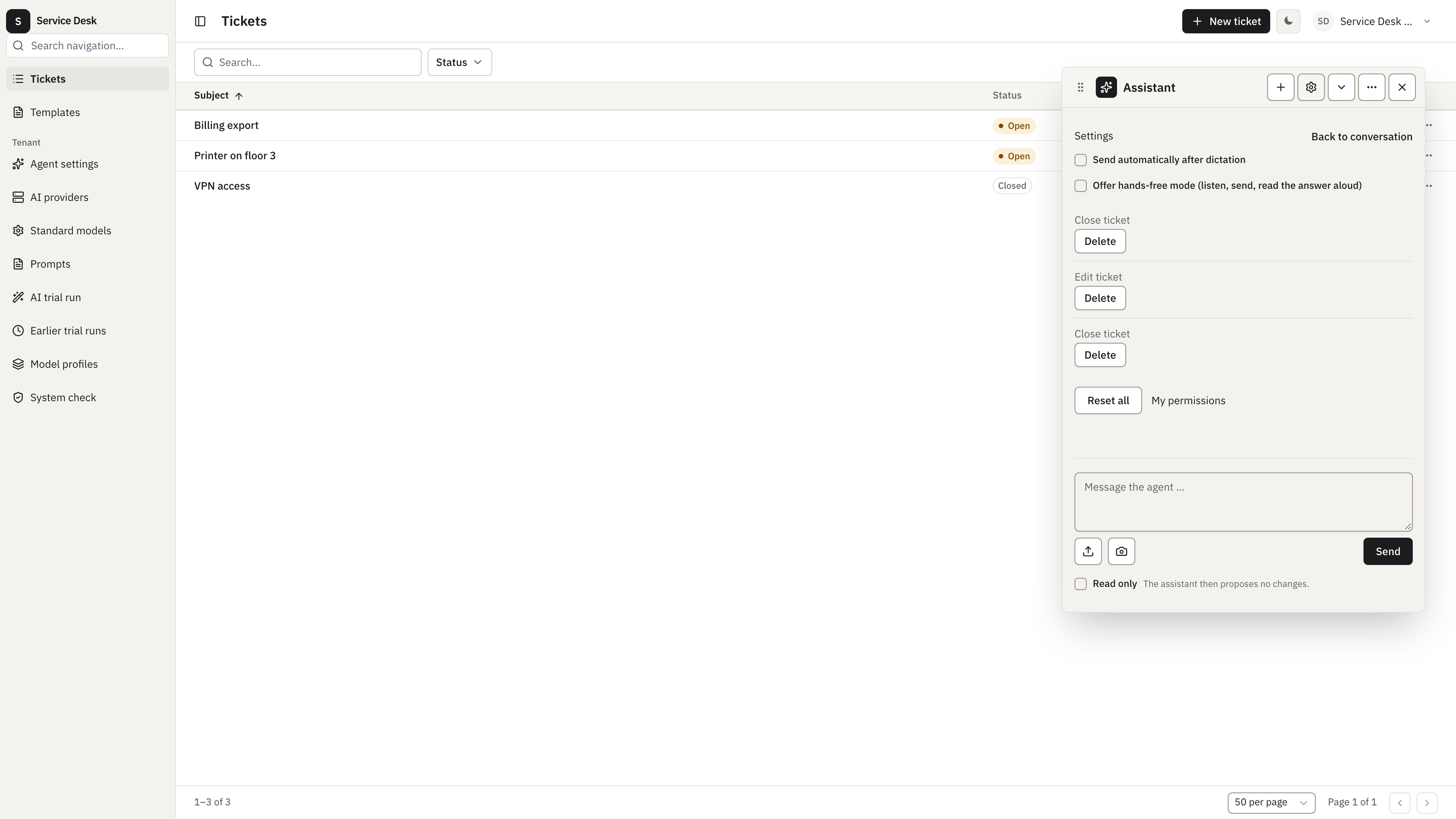
Rules exist at user and tenant scope, with never beating everything and the
default without any rule being ask, a tenant can therefore write its policy up
front instead of waiting for someone to answer the first prompt. The guide has the
full resolution order and the seeding code.
Modes, and the ceiling the tenant sets
Section titled “Modes, and the ceiling the tenant sets”Three modes, set per tenant in config, default approval:
| Mode | What the agent may do |
|---|---|
read-only | Query handlers only. No write ever reaches a card. |
approval | Reads, plus writes as proposals a human answers. The default. |
edit | A write with an always rule and a risk below high dispatches without a card. Everything else still asks. |
edit is not a config value you can simply type: the option only appears when the
feature is mounted with editEnabled and the ai-agent-edit add-on is in the
registry, mount one without the other and boot fails rather than silently running
in the weaker mode. In the other direction the server clamps: the client may narrow
the mode for a conversation (the read-only switch in the screenshot above), never
widen it.
The ceiling is a cap, not a rate limit. ai-agent.tokens counts input plus output
tokens of every provider call against a monthly tenant budget (one million by
default, set with monthly-token-limit). A tenant over budget gets a rate-limit
error that says when the budget resets, the first of the next month, instead of a
mysterious failure. Voice has its own budgets in ai-foundation, see
Voice budgets. All of them are ordinary
cap-counter caps, so they show up wherever the
tenant’s other caps do.
What keeps it safe
Section titled “What keeps it safe”The chat layer adds no new path into your data. Every tool call takes the one that already exists:
- The catalog is per caller. It is built from the registry filtered by the caller’s roles, then filtered again by the permission rules and the mode. A handler the user cannot reach is not offered to the model.
- Dispatch happens as the user. Tool calls run through the same query and write paths a click would take, with the caller’s identity, never a system user. Access rules, validation, hooks and projections all run as usual.
- Write results are re-read, not echoed. After a successful write the agent reads the record back through the ordinary detail query, so field-level read rules strip fields out before the model sees them. The raw write result never goes back to the model.
- Every executed tool call is audited. It lands as an
ai-agent-tool-callrecord alongside the audit trail of the handler it invoked, so “what did the assistant do here” is answerable after the fact. - Conversation turns are personal data. A turn’s payload is declared personal
and keyed to its author, so a GDPR anonymize
crypto-shreds it rather than leaving old prompts
readable; export and erasure requests are served by the
ai-agent-user-datahooks like any other user-owned data.
Window and conversations
Section titled “Window and conversations”The assistant opens in one of three window modes. Docked is a side drawer that
does not block the page. Floating is a floating panel
the user can drag and resize while working on the screen behind it. Minimized
leaves a bubble in the corner that reopens the last mode. AgentLayer takes
defaultMode ("docked" or "floating", default "docked"); after that the
user’s own choice wins and is remembered in the browser, together with the floating
panel’s position and size. Cmd+K or Ctrl+K toggles the assistant. Escape
minimizes the floating panel while focus is inside it. The mode switch, pop-out and
settings sit in the overflow menu of the panel header.
import { AgentLayer } from "@cosmicdriftgamestudio/kumiko-ai-agent/web";
<AgentLayer defaultMode="floating" />;
Pop-out moves the panel into its own always-on-top window through the Document Picture-in-Picture API, so it stays visible while the user switches tabs. Only Chromium browsers have that API; elsewhere the menu item does not appear, and it is also hidden on narrow screens. While the panel is popped out the main window shows the bubble, and Escape in the pop-out window brings the panel back.
Every conversation gets an ai-agent-conversation row: a title taken from the
first prompt (cut to 80 characters), the owner and the time of the last activity.
The conversation list in the panel shows the user’s 50 most recent conversations,
reopens one with its turns, and renames it inline. The open conversation survives a
page reload. Conversations are private to their owner: the list, the turns query
and the rename handler only ever return or change the caller’s own rows, admins
included. Conversations from before this release have no row and do not appear in
the list.
The conversation row adds the ai_agent_conversations table, so generate and apply
the schema migration when you upgrade. Its owner link is personal data: with
ai-agent-user-data mounted, an export includes the user’s conversations, a forget
that deletes removes them, and a forget that anonymizes clears the owner.
All voice features need an AI connection for the capability. A tenant admin adds
connections under AI providers (entity ai-connection: a kind of anthropic,
openai or openai-compatible, an address for compatible servers, and an API key).
The key is write-only, so reads only say whether one is set. On Standard models
the admin then picks a connection and a model for Transcription (dictation) and
Speech (read-aloud). The speechVoice setting there chooses the voice.
ai-provider-openai-compat serves both
capabilities for openai and openai-compatible connections, OpenRouter included
(see the provider matrix). For a compatible
connection the address is the base URL including /v1 (OpenAI’s own address is
fixed): transcription goes to <address>/audio/transcriptions and read-aloud to
<address>/audio/speech. The audio is never stored.
Push-to-talk
Section titled “Push-to-talk”The composer shows a microphone button when the browser can record and the tenant
has a transcription connection. A click starts
and stops a recording. Holding the button, or holding Space while focus is not in a
text field, records until release; a press longer than 250 ms counts as holding. A
level meter shows that the microphone hears something. One recording is capped at
two minutes. The text lands in the input for the user to read and edit, and nothing
is sent until they send it. Users who prefer otherwise can switch on
send-after-dictation in their settings: the message then goes out after a short
delay that they can still cancel.
Live transcription
Section titled “Live transcription”When the tenant’s transcription model can stream, dictation shows the text while the
user speaks. The admin marks the model as streaming in its model profile, and
ai-agent:query:transcribe-policy then reports streaming: true to the panel. The
browser sends 24 kHz PCM audio over the WebSocket route /api/ws/ai-agent/transcribe
and gets partial and final text back. With openai-compat the server opens the
provider’s OpenAI Realtime API at <address>/realtime?intent=transcription, with
https:// in the connection’s address turned into wss://. Unlike the plain HTTP calls, the socket
refuses an http:// address unless the host is a loopback address (localhost,
127.x.x.x, ::1), so the API key never crosses the network unencrypted. vLLM does
not offer the Realtime API.
A live session ends after 300 seconds, when the tenant’s remaining transcription
budget runs out, or after 10 seconds without audio. A user can hold at most two live
sessions at once. A spent budget shows its own message
(agent.transcription_quota_exhausted) instead of falling back to a recording.
Live transcription needs three things from the app:
- WebSocket upgrades on the server.
runProdAppandrunDevApphandle them; an app with its ownBun.servepasseswebSocketUpgradeFetchas described in Add a WebSocket endpoint. Without it the socket answers 501 and the panel falls back to a recording once. - The app’s origin in
auth.allowedOrigins, if the app sets an allowlist. The socket is checked against it like every WebSocket route. blob:in the CSPscript-src, because the audio worklet is loaded from a blob URL.
Read-aloud
Section titled “Read-aloud”Each answer gets a “Read aloud” button when ai-agent:query:speech-policy reports a
speech provider. ai-agent:write:speak turns at most 1000 characters into audio per
call, and the panel splits longer answers into several calls. A user can make 60
calls per minute.
Hands-free
Section titled “Hands-free”With hands-free switched on in the user’s settings, and both a transcription and a
speech provider configured, the assistant runs a conversation loop: it listens,
treats 1.2 seconds of silence as the end of the sentence, sends it, reads the answer
aloud and listens again. The stop button or Escape ends the loop. It also stops when
an answer takes longer than two minutes or a voice budget is used up. Hands-free uses
recordings, not live transcription.
Voice budgets
Section titled “Voice budgets”Voice usage is metered in ai-foundation, not in ai-agent. Both budgets are
opt-in resolvers on createAiFoundationFeature and need cap-counter mounted:
resolveTranscriptionBudgetcounts audio seconds in the capai-foundation.transcription-seconds. The bundledtranscriptionBudgetFromConfigreads the tenant configmonthly-transcription-seconds: a value caps the calendar month, no value only counts.resolveSpeechBudgetcounts read-aloud characters in the capai-agent.speech-characters. Returnlimit: nullto count without a cap.
import {  createAiFoundationFeature,  transcriptionBudgetFromConfig,} from "@cosmicdriftgamestudio/kumiko-ai-foundation";
createAiFoundationFeature({  resolveTranscriptionBudget: transcriptionBudgetFromConfig,  resolveSpeechBudget: () => {    const now = new Date();    return {      limit: 200_000,      periodStartIso: new Date(Date.UTC(now.getUTCFullYear(), now.getUTCMonth(), 1)).toISOString(),    };  },});
Without a resolver, nothing is counted or capped. A used-up budget answers 429 with the time the budget resets.
Attachments
Section titled “Attachments”Users can attach files to a conversation when the opt-in ai-agent-attachments
feature is mounted next to ai-agent. The composer then shows an attach button, and
users can also paste a file or image into the composer or drop it anywhere on the
panel. When the tenant’s provider accepts JPEG images, a camera button takes a photo:
on desktop it shows a live preview with a shutter and a retake option, on phones it
opens the native camera. Photos with an edge longer than 2048 px are scaled down
before upload. All of these go through the same upload and checks as the attach
button. Without the feature, a turn that references attachments fails with
agent.attachments_disabled.
import {  aiAgentAttachmentsUserDataFeature,  createAiAgentAttachmentsFeature,  createAiAgentFeature,} from "@cosmicdriftgamestudio/kumiko-ai-agent";import { createDocumentIngestFoundationFeature } from "@cosmicdrift/kumiko-bundled-features/document-ingest-foundation";import { myWordParserFeature } from "./my-word-parser";
const features = [  createAiAgentFeature(),  createAiAgentAttachmentsFeature(),  // Optional: GDPR export and erasure for attachment rows (needs user-data-rights).  aiAgentAttachmentsUserDataFeature,  // Optional: Word files, read as extracted text on the worker lane by a parser provider you supply.  createDocumentIngestFoundationFeature(),  myWordParserFeature,];
The feature adds the ai_agent_attachments table. Generate and apply the schema
migration before an app boots with it; the
upgrade guide covers the workflow. The server also needs a
file storage provider, because the upload goes through the framework’s generic
POST /api/files route first. ai-agent-attachments:write:attach then binds the
uploaded file to the conversation.
Attaching checks everything the client claims. The file must have been uploaded by the caller, the conversation must belong to the caller, and the bytes must match the file type: images, PDF and Word files by their byte signature, CSV and TXT by valid UTF-8. The type has its own size cap, and each conversation holds at most 10 files and 18 MiB in total. The handler allows 30 attaches per user per minute.
| Type | Extensions | Max size | How the model gets it |
|---|---|---|---|
pdf | 18 MiB | The file itself, if the tenant’s provider reads PDFs | |
| Image | png, jpg, jpeg, webp, gif | 5 MiB | The image itself |
| Text | txt, csv | 512 KiB | The text as a document block |
| Word | docx, doc | 18 MiB | Extracted text, if a document-ingest provider handles the type |
What a tenant can attach depends on its LLM provider. The Anthropic provider reads
PDF, images, TXT and CSV directly. The OpenAI-compatible provider reads images only.
A type the provider cannot read falls back to document ingest when a mounted ingest
provider claims it, so a PDF can still reach an OpenAI-compatible model as extracted
text if LiteParse is mounted. Direct reading always wins when both are possible. A
type that fits neither path is rejected at attach time with
agent.attachment_type_invalid. ai-agent:query:attachment-policy returns the
effective list for the current tenant, and the composer builds its accepted types
from it.
Word files need document-ingest-foundation plus a DOCX/DOC parser provider of your own (see
Document AI workflows). The
text is extracted by a worker job after the upload, so an attachment stays in the
reading state for a moment. ai-agent:query:attachment-status reports ready,
reading or failed for the caller’s own attachments only. The composer polls it,
disables Send while a file is still being read, and shows a message when reading
fails. The server enforces the same rule: a turn that references an attachment that
is not ready, or whose extraction failed, is rejected with
agent.attachment_not_ready or agent.attachment_ingest_failed. The parser’s own
error message stays on the server; the client only sees ingest_failed.
The extracted text goes to the model between explicit begin and end markers, capped at 200,000 characters with a visible truncation note. The markers keep the boundary of the file’s content clear, since the document is untrusted input like any tool result.
Every turn sends the attachments of the whole conversation again. If a file was deleted in the meantime, or the tenant switched to a provider that cannot read its type, the model gets a short placeholder saying the attachment is no longer available, and the turn still runs. A storage outage makes the turn fail.
Attachments are personal data of the person who attached them. The file and
fileName fields are declared personal: { of: "authorId" }. With
aiAgentAttachmentsUserDataFeature mounted, a data export includes the user’s
attachment metadata (the file itself is exported by the files feature). A forget
that deletes removes the attachment rows, and the fileRef hook from
user-data-rights-defaults hard-deletes the linked file row and its stored bytes,
which also removes any extracted text. A forget that anonymizes only removes the
author link, so the file stays in storage and the former owner can no longer reach
it through the assistant.
What it is not
Section titled “What it is not”- Not an autonomous agent. A turn only ever starts from a person typing or speaking in the layer. There is no scheduler, job or webhook that starts one, and nothing runs while nobody is looking.
- No undo. An executed tool call is an ordinary dispatch with ordinary
consequences; reversing it means the same handlers a human would use. A batch that
fails stops at the first failure rather than retrying. This is why
risk: "high"can never be answered with “Always”. - No memory across conversations. The model sees the turns of the conversation it is in, and nothing else. It does not learn your tenant’s habits between sessions, and a new conversation starts from the app’s own state.
- Make your app agent-ready, describe your handlers, find the gaps, seed the rules.
- ai-agent-basic recipe, the runnable service desk behind the code on this page.
- Handler slots:
description/agent, the two fields that decide what the model can see. - Field-level permissions, the read rules that also filter tool results.