Helpdesk
The helpdesk feature gives an app a way to be contacted. Website visitors
send a question, a contact request or a bug report through a form on your
site. Signed-in users report a problem from the admin. Every request lands in
one inbox that the app’s SystemAdmins work through, and they answer by email
from there.
The recipient is always the SystemAdmin group of the app that mounts the feature. There is no per-tenant inbox: requests are stored platform-wide, and a customer that runs its own app is the SystemAdmin of that app.
| Entry point | Who sends | Kinds | Extras |
|---|---|---|---|
Website form (helpdesk:write:submit) | Anonymous visitors | question, contact, bug | Name, email, optional phone, message |
Report a problem (helpdesk:write:report) | Any signed-in user | question, bug, wish | Subject, message, optional phone, up to 5 files |
Mount the feature
Section titled “Mount the feature”The helpdesk recipe is the smallest working mount:
// Helpdesk sample//// A public website form (question, contact request, problem report) that lands with the// SystemAdmins: mail, optional Telegram, a copy to the sender. Spam is handled without a// captcha: honeypot field, single-use proof-of-work challenge, minimum submit time, per-IP// and per-email rate limits. Rejected submits answer 200 with the normal body.//// The website embeds the anonymous client the feature serves itself. The client posts to the// relative paths /api/query and /api/write, so the page must share its origin with the app// (or forward /api to it on its own origin)://   <script src="/helpdesk/client.js"></script>//   const { kinds, phone } = await window.KumikoHelpdesk.load();//   const result = await window.KumikoHelpdesk.submit({ kind, name, email, message, locale });//   // result.kind: "sent" | "rate-limited" (retryAfterSeconds) | "failed"//// Prerequisites the app wires itself://  - `anonymousAccess` (defaultTenantId = SYSTEM_TENANT_ID) so the form needs no login//  - delivery with a mail channel (channel-telegram only with `telegram: true`, off by default)//  - config, user-data-rights and notes-history (required features)//  - files with a file provider, because the entities carry file fields//  - `kumiko schema generate` for the new tables
import { createHelpdeskFeature } from "@cosmicdrift/kumiko-bundled-features/helpdesk";
export const helpdeskFeature = createHelpdeskFeature({  appName: "Sample App",  fields: { phone: "optional" },  // Lowered only to keep the sample test fast; the default (19 bits, 3 seconds) suits production.  spamProtection: { proofOfWorkBits: 8, minSubmitSeconds: 0 },});
📄 On GitHub: samples/recipes/helpdesk/src/feature.ts
The feature requires config, delivery, user-data-rights, files and
notes-history. On top of that the app wires:
anonymousAccesswithdefaultTenantId = SYSTEM_TENANT_ID, so the website form works without a login- a mail channel for
delivery, because notifications and replies go out by email - a file provider, because requests and replies carry file fields
- Redis (
ctx.services.redis), which stores the proof-of-work challenges; the challenge query and the submit fail without it kumiko schema generatefor the new tables
A SystemAdmin can set a Reply-To address for replies on the forwarding screen (see Forwarding).
Options
Section titled “Options”| Option | Default | What it does |
|---|---|---|
appName | required | Name used in the notification mails and in the hint above the report form |
fields.phone | "off" | "off", "optional" or "required"; applies to the website form and the report form |
appVersion | unset | Stored with each request and shown under Origin |
telegram | false | true adds forwarding to a Telegram chat (needs channel-telegram and secrets) |
adminLocale | "en" | Language of the notifications SystemAdmins receive |
requestLink | unset | (requestId) => url; puts a link to the request into the notification. Without it the notification has no link |
reportCancelTarget | unset | Screen the report form’s Cancel button opens; without it there is no Cancel button |
detailLinks | user-edit, tenant-edit | Screens the sender and tenant names in the request header link to; false shows plain text |
rateLimit | 5 per IP per 10 minutes | Limit on the public submit |
emailRateLimits | 3 per email address per day | Limits per sender address; [] turns them off |
spamProtection.minSubmitSeconds | 3 | Minimum time between issuing the challenge and the submit |
spamProtection.proofOfWorkBits | 19 | Difficulty of the proof of work, from 8 to 26 |
spamProtection.challengeTtlMinutes | 30 | How long a challenge stays valid |
retentionKeepFor | "365d" | How long requests and replies are kept |
Place the screens
Section titled “Place the screens”The feature registers its screens but leaves the navigation to the app. The
use-all-bundled sample puts the inbox into the platform workspace, the
forwarding screen under Administration and “Report a problem” under a Help
entry. The same file also places a few screens of other features:
// App-side screen placement. Bundled features self-register their screens// (tenant-list, user-list, tier-admin, privacy-center, page-list, and — since// fw#2312 — user-profile's `profile` screen too). This app only points a nav// entry at it, which also makes it createKumikoApp's landing fallback// (#1258): an open screen not reachable via nav is no longer an eligible// fallback candidate.
import { HelpdeskScreens } from "@cosmicdrift/kumiko-bundled-features/helpdesk";import { MAIL_ACCOUNT_LIST_SCREEN_QN } from "@cosmicdrift/kumiko-bundled-features/inbound-mail-foundation";import {  access,  defineFeature,  type FeatureDefinition,} from "@cosmicdrift/kumiko-framework/engine";import { ADMIN_NAV_QN, ADMIN_NAV_WORKSPACES } from "./admin-nav-feature";
const PLATFORM_WORKSPACES = ["admin-shell:workspace:platform"] as const;
export const appScreensFeature: FeatureDefinition = defineFeature("app-screens", (r) => {  r.describe("App-side nav placement for the user-profile self-service page and the mailbox list.");  r.requires({ features: ["user-profile", "inbound-mail-foundation", "helpdesk"] });  r.nav({    id: "profile",    label: "screen:profile.title",    icon: "user",    screen: "user-profile:screen:profile",    order: 10,  });  // Provider node for template-resolver's text-block tree. The app owns  // label/icon/access, the feature supplies the children plus the editor  // (textBlocksClient in client.tsx).  r.nav({    id: "content",    label: "nav:content.title",    icon: "file",    provider: true,    order: 40,    access: { roles: ["SystemAdmin"] },    workspaces: ["admin-shell:workspace:platform"],  });  r.nav({    id: "mail-accounts",    label: "nav:mail-accounts.title",    icon: "mail",    screen: MAIL_ACCOUNT_LIST_SCREEN_QN,    parent: ADMIN_NAV_QN,    workspaces: ADMIN_NAV_WORKSPACES,    order: 20,  });  r.nav({    id: "helpdesk-requests",    label: "screen:request-list.title",    icon: "mail",    screen: HelpdeskScreens.requestList,    order: 25,    access: { roles: access.systemAdmin },    workspaces: PLATFORM_WORKSPACES,  });  r.nav({    id: "helpdesk-forwarding",    label: "nav:helpdesk-forwarding.title",    icon: "settings",    screen: HelpdeskScreens.forwarding,    parent: ADMIN_NAV_QN,    order: 30,    access: { roles: access.systemAdmin },    workspaces: ADMIN_NAV_WORKSPACES,  });  r.nav({    id: "help",    label: "nav:help.title",    icon: "info",    order: 90,    workspaces: ADMIN_NAV_WORKSPACES,  });  r.nav({    id: "helpdesk-report",    label: "screen:report.title",    icon: "mail",    screen: HelpdeskScreens.report,    parent: "app-screens:nav:help",    order: 10,    workspaces: ADMIN_NAV_WORKSPACES,  });  r.translations({    keys: {      "nav:helpdesk-forwarding.title": { de: "Weiterleitung", en: "Forwarding" },      "nav:help.title": { de: "Hilfe", en: "Help" },      "nav:mail-accounts.title": { de: "Postfächer", en: "Mailboxes" },      "screen:profile.title": { de: "Profil", en: "Profile" },      "nav:content.title": { de: "Inhalte", en: "Content" },    },  });  return {};});
📄 On GitHub: samples/apps/use-all-bundled/src/app/screens-feature.ts
For a dashboard tile with the number of open requests, pass
helpdeskOpenRequestsPanels() to the admin shell, as in
createAdminShellFeature({ extraPlatformPanels: helpdeskOpenRequestsPanels() }).
The website form
Section titled “The website form”The framework ships no form markup. Your website keeps its own layout and
calls a small browser client that the feature serves at
GET /helpdesk/client.js. The script has no dependencies and registers
window.KumikoHelpdesk with two functions:
load()fetches a proof-of-work challenge, starts solving it in the background and resolves with the form options: the allowedkindsand thephonemode. Call it when the page opens, so the work is usually done before the visitor clicks Send.submit(fields)waits for the solution, addschallenge,nonceand alocaletaken from<html lang>when you pass none, and posts the request. It resolves with{ kind: "sent" },{ kind: "rate-limited", retryAfterSeconds? }or{ kind: "failed" }.
The client posts to /api/query and /api/write on the page’s own origin and
sends no cookies. The page with the form therefore has to reach the app’s API
under /api, either because the app serves the site or through a reverse
proxy. This also holds when the script itself comes from another host. A site
built separately can serve the same script itself from
HELPDESK_CLIENT_SOURCE and type its calls with HelpdeskWebsiteClient, both
exported from @cosmicdrift/kumiko-bundled-features/helpdesk/client.
The use-all-bundled sample app serves a working contact page from its
public/ folder, on the same origin as its API:
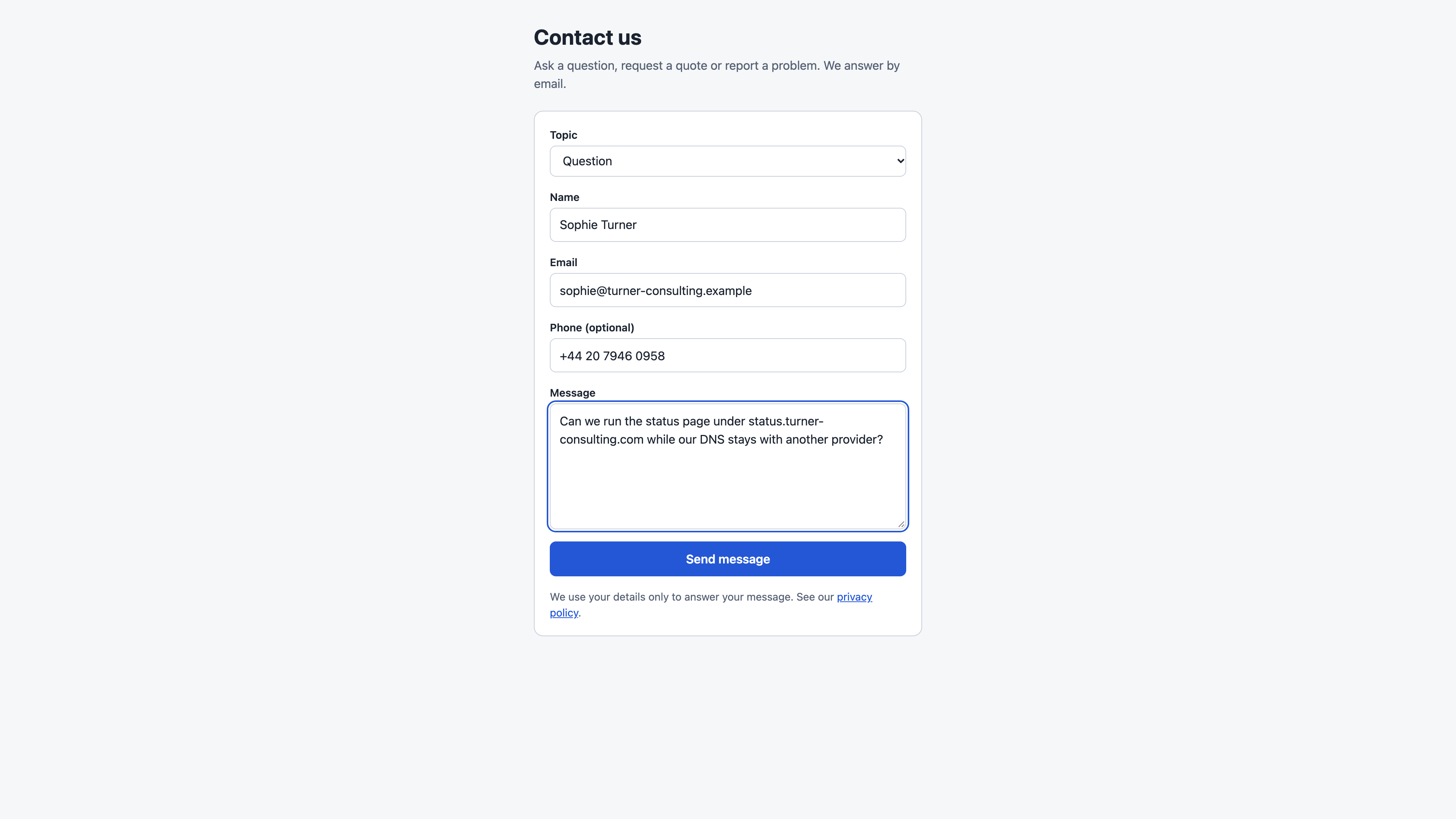
The markup holds the fields, an off-screen honeypot named website and the
privacy note. Topic and send button stay disabled until load() has
answered. The page brings its own styles in helpdesk-contact.css.
<!doctype html><html lang="en">  <head>    <meta charset="utf-8" />    <meta name="viewport" content="width=device-width, initial-scale=1" />    <title>Contact us</title>    <link rel="stylesheet" href="/helpdesk-contact.css" />    <script src="/helpdesk/client.js" defer></script>    <script src="/helpdesk-contact.js" defer></script>  </head>  <body>    <main class="page">      <h1>Contact us</h1>      <p class="intro">Ask a question, request a quote or report a problem. We answer by email.</p>
      <form id="contact-form" class="form">        <label class="field">          <span class="label">Topic</span>          <select id="kind" name="kind" required disabled></select>        </label>        <label class="field">          <span class="label">Name</span>          <input id="name" name="name" type="text" autocomplete="name" maxlength="120" required />        </label>        <label class="field">          <span class="label">Email</span>          <input id="email" name="email" type="email" autocomplete="email" maxlength="254" required />        </label>        <label class="field" id="phone-field" hidden>          <span class="label">Phone</span>          <input id="phone" name="phone" type="tel" autocomplete="tel" maxlength="40" />        </label>        <label class="field">          <span class="label">Message</span>          <textarea id="message" name="message" rows="6" maxlength="5000" required></textarea>        </label>        <div class="trap" aria-hidden="true">          <label>            Website            <input id="website" name="website" type="text" tabindex="-1" autocomplete="off" />          </label>        </div>        <button id="submit" class="button" type="submit" disabled>Send message</button>        <p class="privacy">          We use your details only to answer your message. See our          <a href="/legal/privacy">privacy policy</a>.        </p>      </form>
      <p id="status" class="status" role="status" aria-live="polite"></p>    </main>  </body></html>
📄 On GitHub: samples/apps/use-all-bundled/public/helpdesk-contact.html
The script fills the topics with readable labels and shows or requires the
phone field depending on the mode from load(). It turns each submit()
result into a status line. After a sent message it clears the form and calls
load() again, because every submit uses up its challenge.
// Must be served from the app's origin: client.js posts to the relative /api paths without cookies.(() => {  const KIND_LABELS = {    question: "Question",    contact: "Quote or contact request",    bug: "Problem report",  };
  const form = document.getElementById("contact-form");  const kindSelect = document.getElementById("kind");  const phoneField = document.getElementById("phone-field");  const phoneInput = document.getElementById("phone");  const submitButton = document.getElementById("submit");  const status = document.getElementById("status");
  function showStatus(state, text) {    status.dataset.state = state;    status.textContent = text;  }
  function fillKinds(kinds) {    kindSelect.replaceChildren(      ...kinds.map((kind) => {        const option = document.createElement("option");        option.value = kind;        option.textContent = KIND_LABELS[kind] ?? kind;        return option;      }),    );    kindSelect.disabled = false;  }
  function applyPhoneMode(mode) {    phoneField.hidden = mode === "off";    phoneInput.required = mode === "required";    phoneField.querySelector(".label").textContent =      mode === "required" ? "Phone" : "Phone (optional)";    phoneInput.disabled = mode === "off";  }
  function readFields() {    const fields = {      kind: kindSelect.value,      name: form.elements.name.value.trim(),      email: form.elements.email.value.trim(),      message: form.elements.message.value.trim(),      website: form.elements.website.value,      page: window.location.pathname,    };    const phone = phoneInput.value.trim();    if (!phoneInput.disabled && phone !== "") fields.phone = phone;    return fields;  }
  function describe(result) {    if (result.kind === "sent") return ["sent", "Thank you, your message was sent."];    if (result.kind === "rate-limited") {      const minutes = Math.ceil((result.retryAfterSeconds ?? 0) / 60);      return [        "rate-limited",        minutes > 0          ? `Too many messages from your connection. Please try again in ${minutes} minutes.`          : "Too many messages from your connection. Please try again later.",      ];    }    return ["failed", "Your message could not be sent. Please try again in a moment."];  }
  function loadOptions() {    return window.KumikoHelpdesk.load().then(      (options) => {        fillKinds(options.kinds);        applyPhoneMode(options.phone);        submitButton.disabled = false;      },      () => showStatus("failed", "The form is not available right now. Please try again later."),    );  }
  form.addEventListener("submit", (event) => {    event.preventDefault();    submitButton.disabled = true;    showStatus("sending", "Sending...");    window.KumikoHelpdesk.submit(readFields()).then((result) => {      const [state, text] = describe(result);      showStatus(state, text);      if (result.kind === "sent") {        form.reset();        // A submit uses up the prefetched challenge, so prepare the next one.        loadOptions();      } else {        submitButton.disabled = false;      }    });  });
  loadOptions();})();
📄 On GitHub: samples/apps/use-all-bundled/public/helpdesk-contact.js
A few rules follow from the submit schema:
- The payload accepts exactly
kind,name,email,phone,message,locale,websiteandpage. Any other field makes the submit fail. - Send
phoneonly whenload()reportsoptionalorrequired. With the defaultoffa filled phone field is rejected. pageis stored without its query string and fragment, so tokens in a URL do not end up in the inbox.- Website requests carry no files.
Spam protection
Section titled “Spam protection”The form needs no captcha and loads no third-party script. The server checks each submit in this order:
- Honeypot: the
websitefield must be empty. - Challenge: it must have been issued by this server and is used up by the first submit.
- Minimum time: the submit must arrive at least
minSubmitSecondsafter the challenge was issued. - Proof of work: SHA-256 of
challenge:noncemust start withproofOfWorkBitszero bits.
A submit that fails any of these gets the same success response as a real
one, so submit() returns sent, but nothing is stored or sent. A bot cannot
tell which check stopped it. On top of that, the submit is limited per IP
address and the challenge query to 30 per IP per 10 minutes. The limit per
email address only counts submits that passed the checks above, so someone
posting a stranger’s address without solving the challenge cannot use up
that person’s quota.
Inbox and replies
Section titled “Inbox and replies”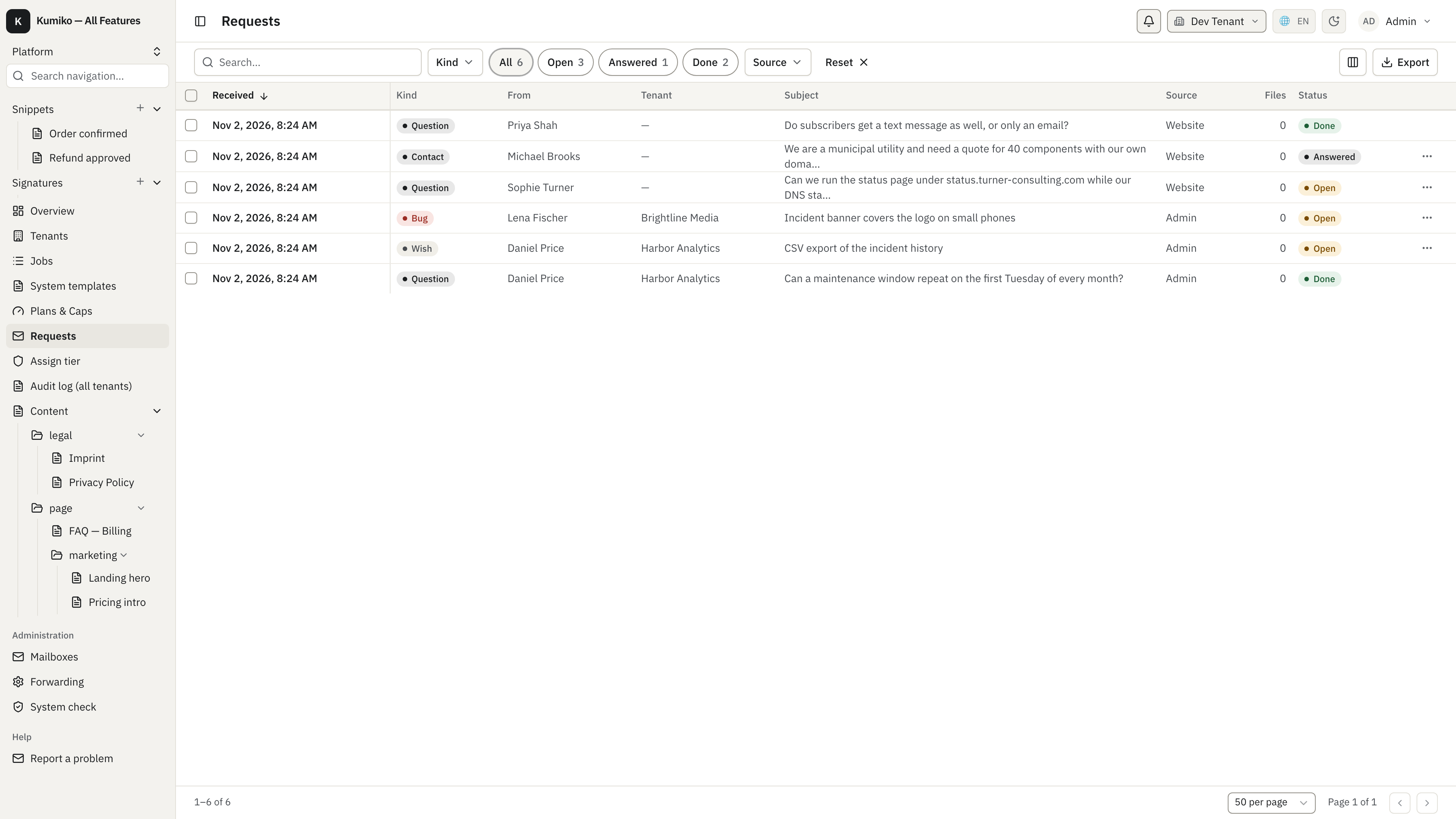
The inbox lists every request with its kind, sender, tenant, subject, source and status. It opens filtered to Open; the screenshot shows the All filter with open, answered and done requests side by side. Rows can be marked as done one by one or several at once.
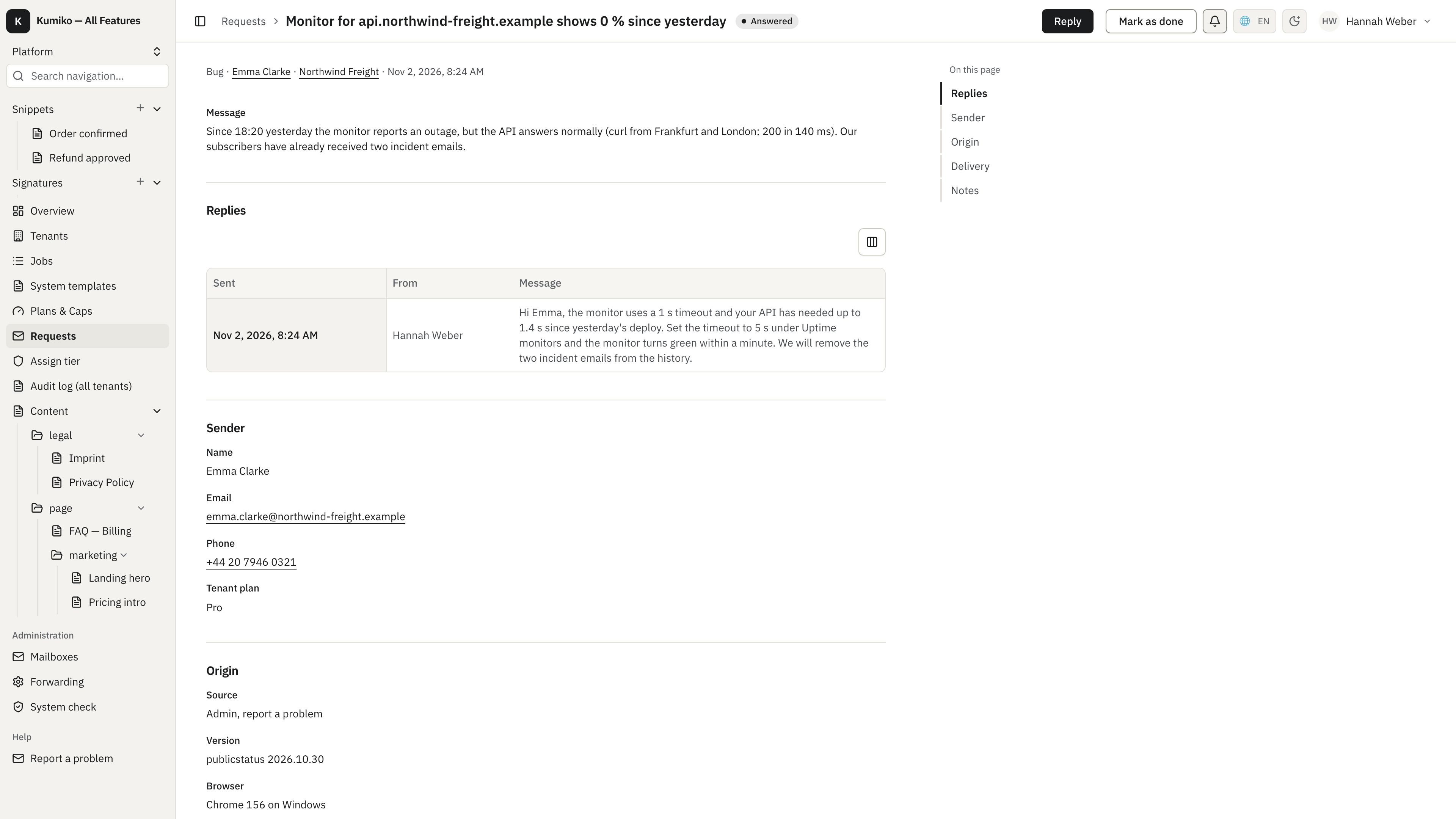
The detail shows the message, the replies sent so far, the sender with a
clickable phone number, the origin and the delivery status of each
notification. For a report from the admin, the feature records the tenant and
its plan, the app version and the browser itself. Further down,
SystemAdmins keep internal notes, which come from notes-history and are
never sent to the sender.
Reply opens a form in a drawer with the message, optional files (up to five)
and a checkbox to mark the request as done right away. The reply goes out by
email, quotes the original request and carries the files as attachments. Its
Reply-To is the address from the forwarding screen, or the replying
SystemAdmin’s own address when that field is empty, so answers from the
sender land in a normal mailbox. A signed-in sender also gets an in-app note
when the app mounts channel-in-app. Each reply sets the request to Answered,
or to Done when the checkbox is ticked.
Report a problem in the admin
Section titled “Report a problem in the admin”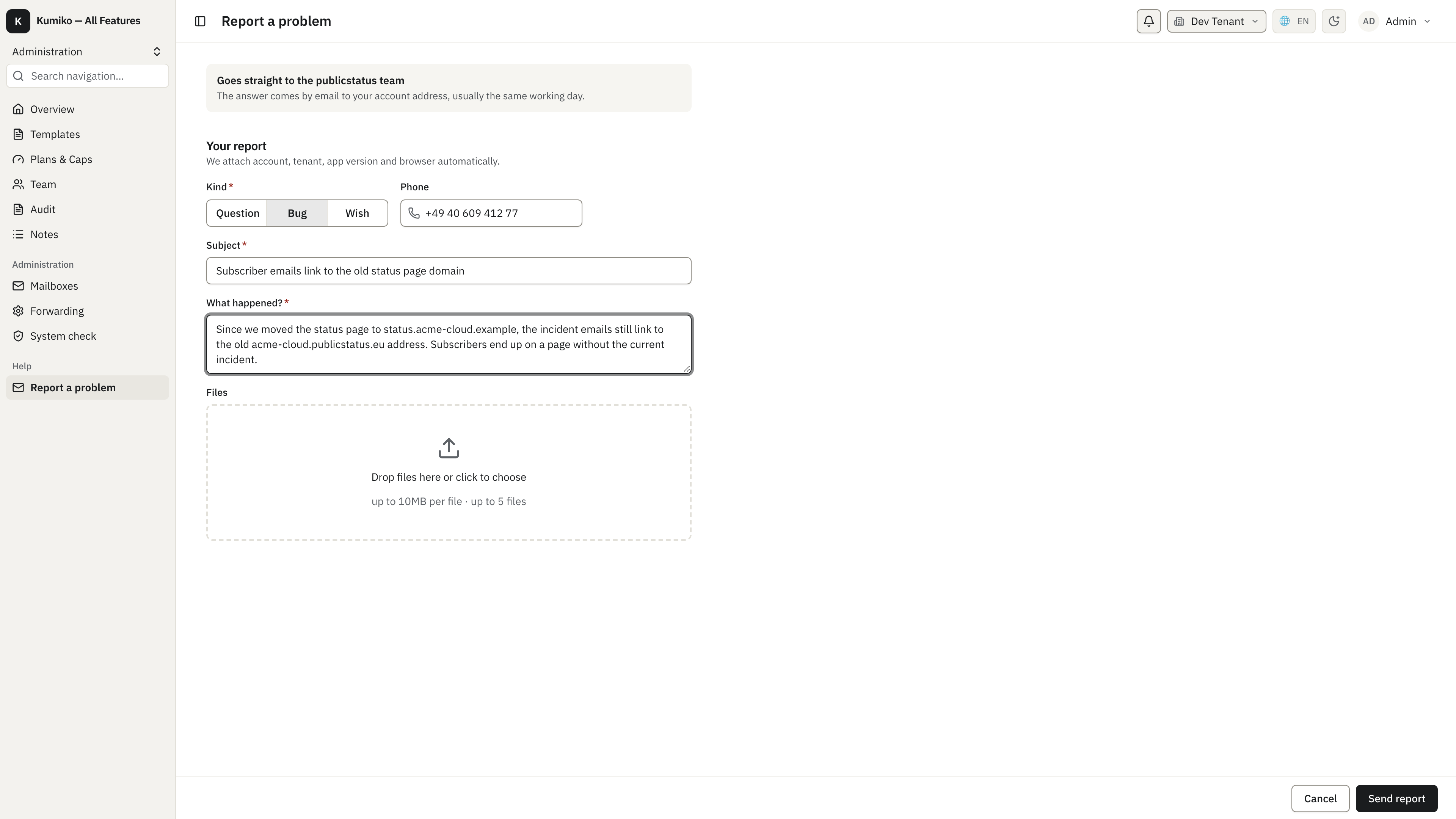
Signed-in users report a question, a bug or a wish with a subject, a
description and up to five files. Name, email, account and tenant come from
the session; the hint above the form uses appName (the sample sets it to
publicstatus). The sender gets a copy by email. Reports are limited to 10
per user per hour.
Forwarding
Section titled “Forwarding”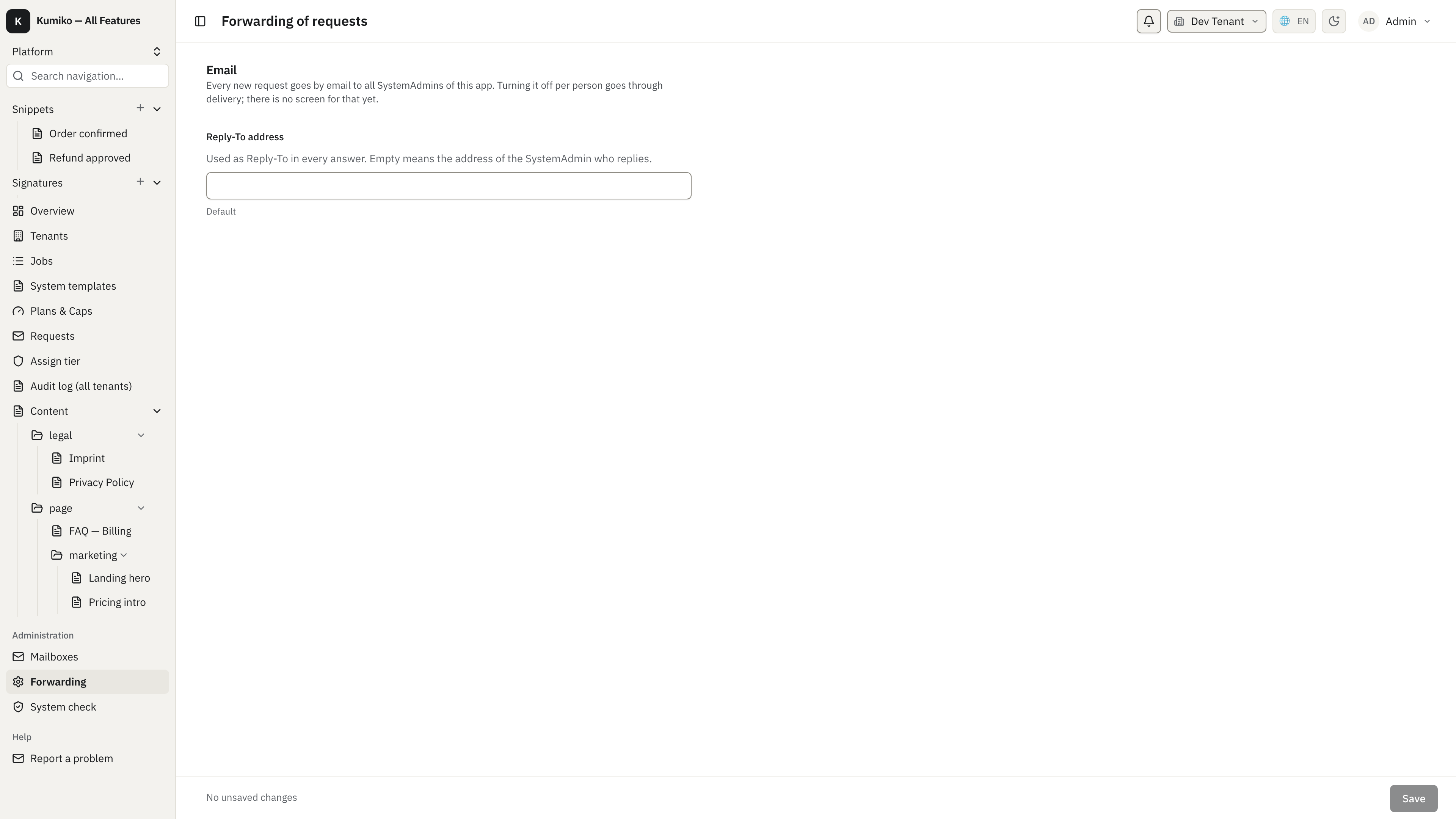
Every new request goes by email to all SystemAdmins of the app. The forwarding
screen holds the Reply-To address for replies. With telegram: true it gets a
second section for a Telegram chat id or @channel and a button that sends a
test message; the sample runs without Telegram, so the screenshot shows only
the email section. An empty chat id keeps Telegram off.
Privacy
Section titled “Privacy”The helpdesk stores personal data, so it follows the framework’s data protection paths:
- Notifications about a new request, by mail and Telegram alike, contain only
the kind, the app name and, with
requestLink, a link into the inbox. Name, address, phone, subject and message never leave the app this way, because a sent mail or chat message cannot be shredded or recalled. There is no option to include them. - A website sender gets a fixed acknowledgement that repeats nothing they typed.
- Name, email, phone, subject, message and the reply texts are marked as personal data and are ready for crypto-shredding.
- Requests and replies declare a retention of 365 days with hard delete,
counted from submission or sending;
retentionKeepForchanges it. - Through
user-data-rights, a user’s export contains their requests with the replies, and erasure deletes them together with their files. Requests sent from the website are matched by email address only once the user has verified that address.
See also
Section titled “See also”- Feature reference: helpdesk for dependencies, config keys and the full list of handlers.
- Recipe: helpdesk, the mount above with its integration test.
- Compliance & DSGVO for
data-retentionanduser-data-rights. - Notifications for
deliveryand the mail channel.